Before running npm install on a package an AI coding assistant just imported for you, check three things in this order: does the package actually exist on the npm registry, does its publish history and maintainer look legitimate, and does the assistant’s own reasoning for choosing it hold up. If any package name in the diff feels slightly off, unfamiliar, or “close enough” to a name you’d expect, treat that as a reason to check rather than a reason to dismiss it. The risk is not hypothetical: installing an unverified package can execute arbitrary code the moment a postinstall script runs, before you have written a single line against it.
This is worth taking seriously because it has a name now, and the name exists because it became a real attack. Below is the fast manual check, the automated help available, and what to do if the package is already sitting in node_modules. This check is one item on a longer list worth running on any AI-generated change (see the full ten-point checklist for merging AI-written code) and it sits alongside the broader discipline covered in working with an AI coding assistant day to day.
What a hallucinated package actually looks like
The term is slopsquatting, coined by Seth Larson, Security Developer-in-Residence at the Python Software Foundation. It describes a specific attack pattern: an AI coding assistant, asked to solve a problem, generates an import or require statement for a package that sounds plausible and follows normal naming conventions, but does not exist. An attacker who has noticed that models keep repeating the same invented name registers that exact package on npm (or PyPI, for Python), fills it with malicious code, and waits.
This is not a rare edge case. A large academic study analyzing code-generating models across a substantial test corpus found that close to one in five recommended packages simply did not exist, amounting to more than 200,000 unique invented package names across the research. More tellingly, when researchers reran identical prompts ten times each, a large share of the hallucinated names reappeared on every single run. That repeatability is the important part: it means an attacker does not need to guess randomly. They can run the same prompts developers run, see which fake names keep coming up, and squat on exactly those.
The mechanism that makes this dangerous rather than merely annoying is the npm postinstall lifecycle script. A package can run arbitrary code automatically the moment it finishes downloading, before any of its exported functions are ever called. Increasingly, it is not even a human running npm install: an AI coding agent given permission to execute shell commands can hallucinate a package name and install it with zero human review in between, which is exactly the scenario security researchers describe as the fastest-growing version of this attack.
The 30-second manual check
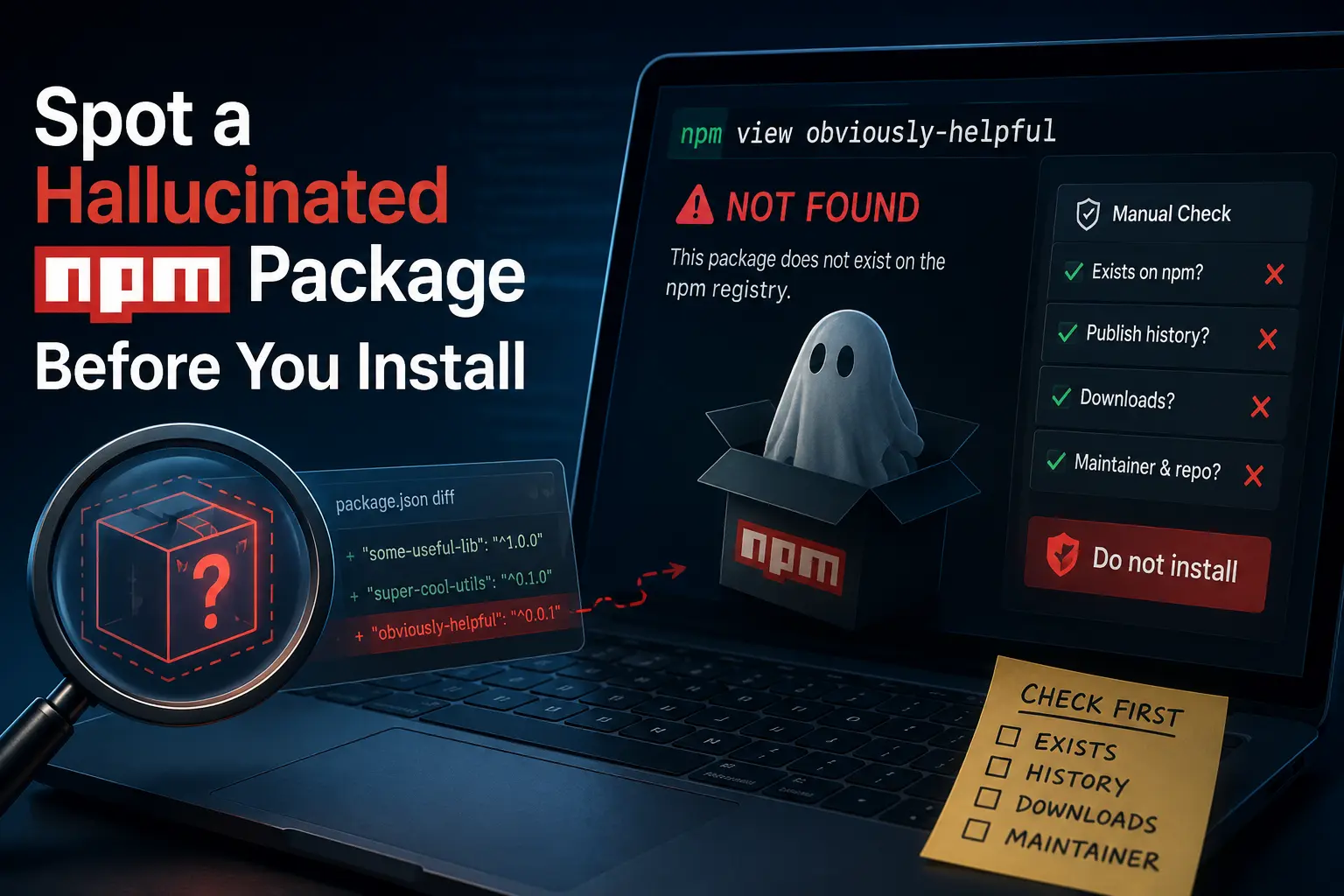
Before running the install, this sequence catches most hallucinated packages without any special tooling:
- Search the npm registry directly (npmjs.com, or
npm view <package-name>). If the command errors out or the search returns nothing close to the exact name, that is the strongest signal: a real, actively used package will resolve immediately. - Check the publish date and version history. A package that was registered days ago with a single 0.0.1 release is a different risk profile than one with years of dated version history.
- Check weekly download counts. A package an assistant is confidently recommending as if it were standard tooling, but which shows a handful of weekly downloads, is a mismatch worth noticing on its own.
- Check who maintains it, and whether it links to a real, active source repository. A missing repository link, or a repository with no commit history behind the package, is a second independent signal pointing the same direction as the first three.
None of these checks require deep security expertise. They require treating an unfamiliar package name as a claim to verify, the same way you would treat an unfamiliar function or method call the assistant invented one level deeper in the same code.
Automated help, once the manual check is a habit
The manual check above scales fine for the occasional unfamiliar import, but it does not scale to a large AI-generated diff that touches a dependency file directly. Two additional layers help:
Lockfile review. package-lock.json (or the equivalent for another package manager) records exactly what actually resolved, including transitive dependencies an assistant never mentioned. Reviewing a diff to that file, not just to package.json, surfaces packages that were pulled in as dependencies of a dependency, which a quick glance at the top-level manifest will miss entirely.
Dedicated hallucination-detection tooling. Purpose-built tools exist now specifically to check whether a set of package names recommended by an AI tool are real, across npm, PyPI, crates.io and Go modules, by checking them against the actual registries in bulk before anything gets installed. Running an entire assistant-generated dependency list through a check like this before the first install is a stronger habit than checking packages one at a time as they come up.
If it is already installed
If a suspicious package is already sitting in node_modules because the install already ran, the response is a containment procedure, not a panic:
- Do not simply delete the entry and move on. First check
package-lock.jsonfor exactly what version resolved and what it pulled in as its own dependencies, so you know the actual scope of what ran. - Run your package manager’s audit command (
npm auditor the equivalent) to surface any known-vulnerable or flagged packages already in the tree. - Remove
node_modulesentirely and reinstall from a clean, reviewed lockfile, rather than trusting that the currently installed copy matches what the lockfile says. A postinstall script that already ran once may have modified local files; a clean reinstall at minimum stops it from running again unreviewed. - If the package had install-time script execution and you cannot rule out that it read local secrets, treat any API keys or credentials present on that machine as potentially exposed and rotate them. This is the same discipline covered in more depth for leaked credentials generally; the trigger here is simply “an unverified package executed on this machine,” which is enough reason to apply it.
FAQ
How common is it for an AI assistant to recommend a package that doesn’t exist?
Research into code-generating models has put the rate at close to one in five recommended packages in some large test corpora, and found that the same invented names tend to repeat across runs rather than appearing at random.
Is this only a risk with npm and JavaScript?
No. The same pattern has been documented against PyPI for Python and other language registries; npm is simply where the largest share of AI-assisted web and Node.js work runs into it, which is why it dominates the examples here.
Can I trust a package just because the assistant explained why it chose it?
No. The explanation is generated by the same process that generated the package name, so a confident-sounding justification carries no independent verification value. Check the registry, not the assistant’s reasoning about the registry.
What is the single fastest check if I only have time for one?
Search the package on the actual registry before installing anything. A package that does not resolve, or resolves to something with no meaningful history, is the clearest signal available and takes seconds to check.
Does this replace running a dependency security scanner?
No. A registry check catches whether the package exists and looks legitimate at a glance. A dependency security scanner catches known vulnerabilities in packages that do exist. Both matter, and neither substitutes for the other.