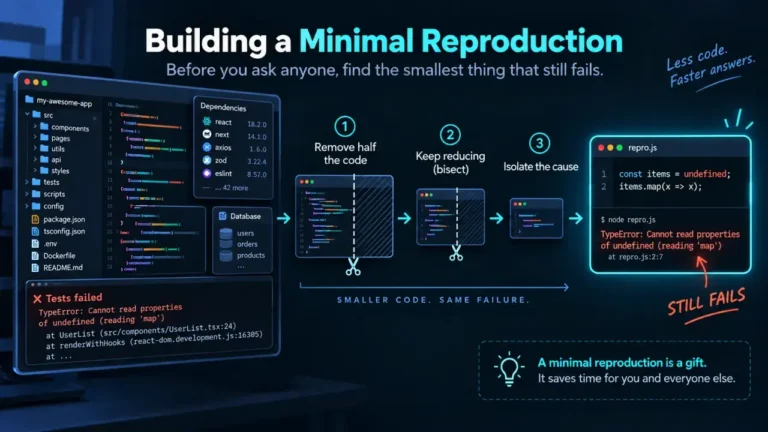
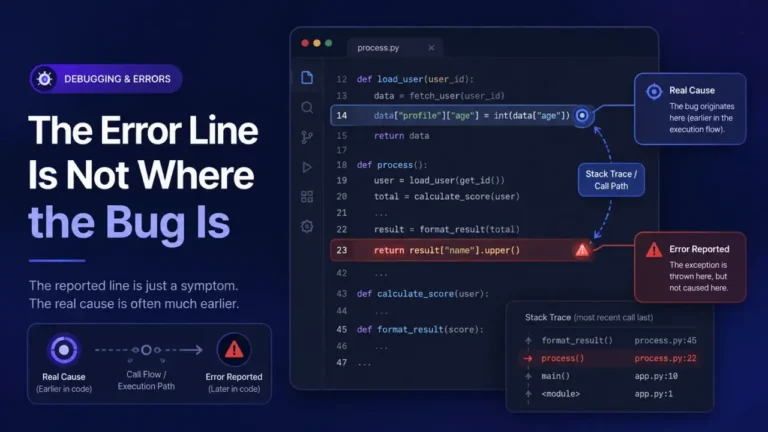
The error reads PHP Fatal error: Allowed memory size of X bytes exhausted (tried to allocate Y bytes). Raising the memory_limit ini directive, in php.ini, .htaccess, ini_set(), or WP_MEMORY_LIMIT on WordPress, fixes it when the script legitimately needs more memory than the current ceiling allows. It does not fix it, and only delays the same crash at a higher number, when the real cause is an unbounded loop, a runaway recursive function, or code loading an entire large file or result set into memory at once instead of processing it in pieces. Telling the two apart, before you touch the limit, is the actual fix.
What the error is telling you
PHP’s memory_limit directive caps how much memory a single script execution is allowed to allocate, and it exists specifically to stop one broken or malicious script from consuming all the memory on a shared server. The default is 128M as of current PHP versions, per the PHP manual’s core php.ini directives. When a script’s total allocation crosses that ceiling, PHP kills it immediately with this fatal error rather than letting it keep grabbing memory. The number in the message (“tried to allocate Y bytes”) is the specific allocation that finally pushed the running total over the limit, not necessarily the single largest thing your script did.
The three distinct causes, and how to tell them apart
1. The limit is genuinely too low for legitimate work. A script that generates a large PDF report, processes a big image, or exports a wide dataset can need more memory than a shared-hosting default provides, through no fault of the code. If the memory use is proportional to a real, bounded piece of work (one report, one image, one export) and the number stays roughly the same each time you run it, this is the honest case for raising the limit.
2. An unbounded loop or recursive function keeps allocating without releasing anything. A while loop that never terminates, or a recursive function missing its base case, keeps creating new variables, objects, or array entries on every iteration and never frees the old ones. This looks identical to case 1 at the moment of crash, the difference is that raising the limit here does not fix anything; it just buys a few more seconds before the same script hits the new, higher ceiling and crashes again. If doubling the limit does not meaningfully change how far the script gets before failing, this is almost always the real cause.
3. The whole dataset is loaded into memory at once instead of streamed. file_get_contents() on a multi-gigabyte file, SELECT * against a table with millions of rows fetched into a single array, or json_decode() on an entire large API response, all hold the complete result in memory simultaneously. This is the case most often mistaken for case 1, because the fix that seems obvious (raise the limit) actually works, temporarily, until the dataset grows again. The real fix is processing the data in chunks: reading a file line by line, paginating a database query, or streaming a JSON response instead of decoding it whole.
Confirm which one you actually have before changing anything
Add this near the top of the failing script, or wherever you suspect the allocation is climbing:
error_log('Memory at checkpoint: ' . memory_get_usage(true) . ' / peak: ' . memory_get_peak_usage(true));
memory_get_usage() reports what the script is holding right now; memory_get_peak_usage() reports the highest point reached so far, per the PHP manual. Placing these calls at the start and end of a loop, or before and after a suspect function call, shows you whether memory climbs steadily with each iteration (cases 2 or 3) or jumps once for a single bounded operation (case 1). If it climbs on every loop iteration and never drops, you have found the loop or recursive call responsible, and that is where to fix the actual code rather than the ini setting.
Raising the limit correctly, when it is genuinely case 1
In php.ini, on servers where you control it:
memory_limit = 256M
Per request, without touching server configuration:
ini_set('memory_limit', '256M');
Note that ini_set() only affects the current script execution and only works if memory_limit has not already been exhausted by the time the call runs; it cannot rescue a script that has already crashed.
On WordPress specifically, two separate constants exist in wp-config.php, and they are commonly confused:
define( 'WP_MEMORY_LIMIT', '256M' );      // ceiling for regular front-end requests
define( 'WP_MAX_MEMORY_LIMIT', '256M' );  // ceiling for admin-area requests, which run heavier code
Setting only WP_MEMORY_LIMIT leaves the admin area, where imports, media processing, and plugin dashboards typically run, capped at WordPress’s separate admin default, which is why a front-end fix sometimes appears to do nothing for an admin-side crash.
Why -1 is not the fix it looks like
Setting memory_limit = -1 removes the cap entirely, and PHP will let a script consume memory without bound. On a shared or resource-limited server this does not make the error go away; it trades a controlled PHP fatal error, which at least tells you what happened, for an uncontrolled server-level out-of-memory event, where the operating system’s OOM killer can terminate PHP-FPM or the whole web server process with no PHP error log entry explaining why. -1 is reasonable for a one-off CLI script you are actively watching, such as a data migration you are running yourself. It is not a production setting for anything handling requests from the outside.
Other PHP fatal errors worth recognizing on sight
A memory exhaustion crash is one of a handful of PHP fatal errors that show up constantly and get misdiagnosed the same way, by treating the symptom as the whole story. Call to a member function on null and cannot redeclare function both follow the same pattern worked through here: a message that names the immediate failure, and two or three genuinely different underlying causes hiding behind it.
FAQ
How do I know what my current memory_limit is set to?
Run php -i | grep memory_limit from the command line, or call phpinfo() in a script and search the output, or ini_get('memory_limit') for a single value. On WordPress, the admin’s Site Health tool under Info shows the server’s PHP memory limit directly.
Should I just set the limit high and move on?
Only after confirming the code is not leaking memory in a loop, as covered above. A high limit on genuinely leaking code just moves the crash further into the request, wastes server resources getting there, and can make the actual bug harder to find later because it surfaces less predictably.
Does raising memory_limit slow down my site?
Not by itself. The limit is a ceiling, not an allocation; PHP does not reserve memory upfront based on the configured limit. What costs performance is the code that actually consumes memory approaching that ceiling, which is the underlying problem worth fixing regardless of where the limit sits.
I raised the limit and the error still appears at the new number. What does that mean?
This is close to diagnostic proof of case 2 or case 3 above: a script whose memory need is genuinely bounded does not usually double its requirement the moment you double the ceiling. Go back to the loop-or-stream check with memory_get_usage() rather than raising the limit again.
Is this the same as the “stack trace” I would see for other PHP fatal errors?
Not quite. This particular fatal error is thrown by PHP’s memory manager itself rather than by your code throwing an exception, so it does not always print a full call stack the way an uncaught exception does. The message and the file/line it names are usually enough to identify the allocation that pushed the total over the limit; from there the checkpoints above find the real cause.