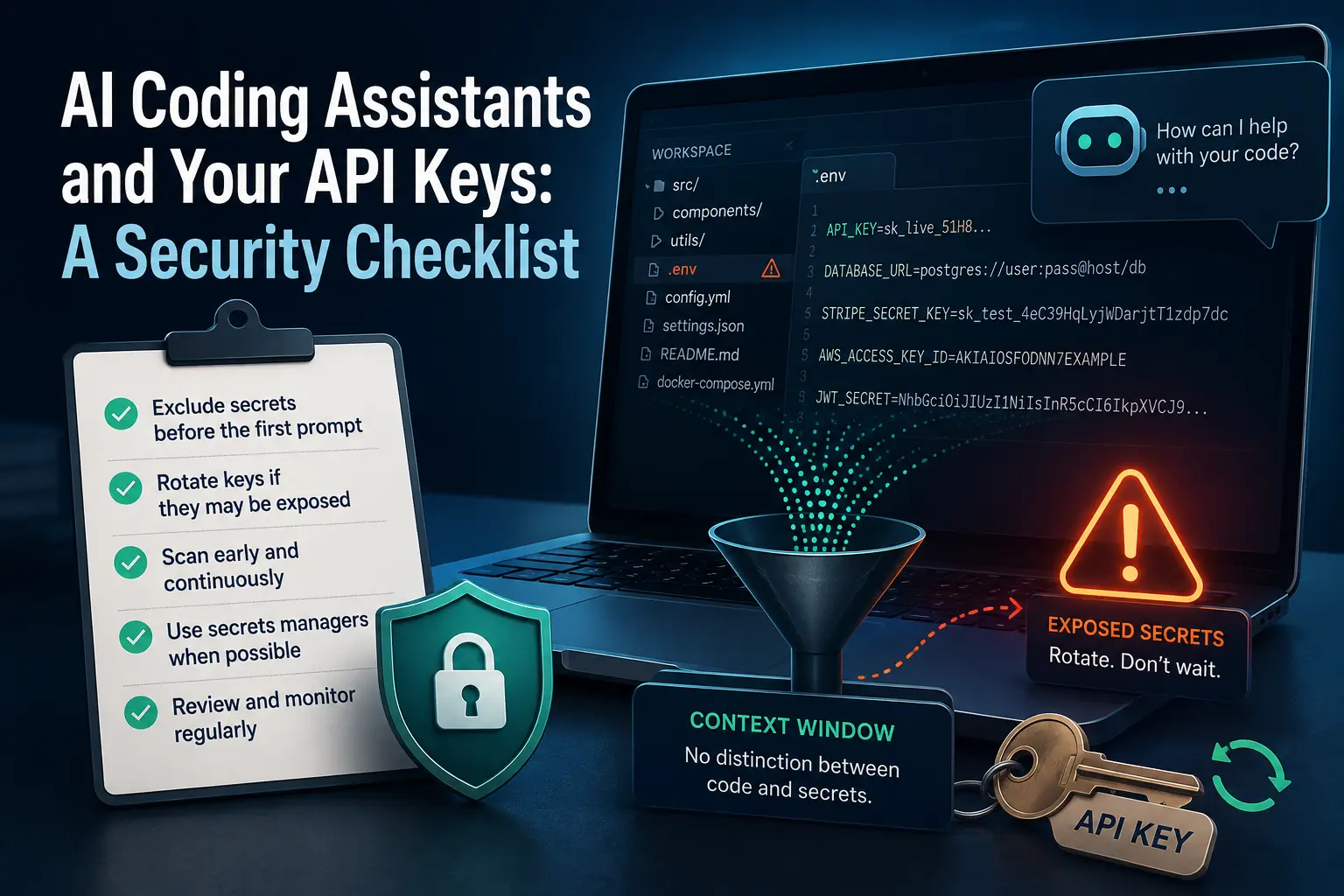
Before you accept another suggestion from an AI coding assistant today, check what it can actually read. Assistants build context by ingesting your workspace, and in practice that means your repository plus your .env files plus any config or instruction files sitting in the project directory, with no distinction made between source code and secrets. The fix is not caution while typing prompts. It is excluding credential files from context before the first prompt, and treating any key a model may have already read as potentially exposed rather than assuming it stayed private. If a key has already been read, rotate it. Do not wait to find out whether it actually leaked.
This matters because the risk is measured, not theoretical: research comparing AI-assisted commits to a general baseline found secrets leaking at roughly double the baseline rate. Below is what to exclude, what to do if something may already have leaked, and the ongoing habit that catches what setup alone will miss.
Why this happens: context windows are a flat namespace
An AI coding assistant does not read your project the way a compiler or a version-control client does, selectively, by file type and purpose. It ingests the workspace to build the context it reasons over, and a context window has no built-in concept of “this file is source code, this file is a secret.” Your .env file sits in your project directory specifically so your application can read it at runtime. An assistant configured to read your project to help you can read it too, for the identical reason, and that is the intended behavior of the tool working against your interests rather than a bug.
Once a credential has been ingested into a model’s context, generated code can reproduce it directly, and a shared conversation log or a pasted output can carry it somewhere else entirely. Prompt-injection research disclosed in December 2025 covered over thirty vulnerabilities across several major AI-enabled IDEs, demonstrating how a manipulated file or comment combined with legitimate assistant features could be used to exfiltrate files and credentials. That disclosure is a named historical event, not a claim that every current tool is unpatched today, but it establishes that this is an actively studied attack surface, not a hypothetical one.
What to exclude before the first prompt
The fix that matters most happens before you type anything, not while you are reviewing what came back:
Use the tool’s own content-exclusion controls. Several assistants support project- or organization-level settings that block specified files or patterns from being read into context at all. Configuring this once, at the repository or organization level, is more reliable than remembering to avoid a file every session.
Add credential and secret files to whatever ignore mechanism the assistant respects, in addition to your .gitignore. .env, any *.pem or key file, and any internal config file holding connection strings belong on that list, not just on the list of things you keep out of version control. Being excluded from git and being excluded from an assistant’s context are two different settings, and only one of them is likely already configured on most projects.
Question whether the credential needs to be in the project directory at all. A .env file loaded by convention is easy code to write, and it is also the single easiest thing on disk for an assistant to ingest whole. Where a secrets manager or environment-injected variable is a realistic option, it removes the file from the workspace context entirely rather than relying on an exclusion rule to hold.
If a key may already have been read: rotate it
Treat this as the default response, not an escalation reserved for confirmed leaks:
- Assume exposure rather than requiring proof of it. A key that a model has ingested, or that appeared in a shared chat log, a pasted error message, or a generated code sample, should be treated as compromised. Waiting for evidence that it actually leaked before rotating it defeats the point of rotation as a cheap, fast mitigation.
- Rotate the credential at the provider, not just in your local
.envfile. Generating a new key and revoking the old one closes the exposure; changing only your local copy does not, if the old value is sitting anywhere else, a log, a chat history, a generated snippet committed somewhere. - Check where else the old value might already exist (commit history, CI logs, a teammate’s local environment, a shared document) and rotate with those in mind, not just the file you noticed it in.
Ongoing habits: secret scanning belongs in the editor, not only at commit time
A pre-commit hook or a repository-level scanner catches a secret before it reaches a shared history, which matters, but it runs after the assistant has already had the file open in context for the whole session. Continuous, editor-level secret detection, an alert the moment a credential-shaped string appears in an active file, closes that gap instead of relying entirely on a check that runs at the end of the workflow. This is also the same discipline behind check 9 on the ten-point checklist for merging AI-written code: scanning the diff for secrets is a fast, mechanical check worth running on every change, not only the ones that feel risky. It sits alongside the broader working discipline covered in working with an AI coding assistant day to day, and it connects directly to how much codebase context to give an assistant in the first place: the less unscoped material an assistant can read, the smaller this entire problem becomes before a single check ever has to catch it.
FAQ
Is excluding .env from git enough to keep it out of an AI assistant’s context?
No. .gitignore controls what goes into version control. It has no effect on what a coding assistant reads from your working directory to build context. The two need to be configured separately.
Do I need to rotate a key every time I use an AI assistant?
No. Rotation is the response to a credential that may have been read or shared, not a routine step for every session. The goal is excluding secrets from context in the first place, so rotation stays the exception rather than a constant chore.
What if my team already uses a secrets manager instead of .env files?
That removes the credential from the project directory as plain text, which is the strongest version of this fix. It does not eliminate every risk, since a value can still appear in a log or an error message the assistant reads, but it removes the single largest and easiest exposure.
Does this apply equally to every AI coding assistant?
The specific configuration screen differs by tool, but the underlying mechanism, ingesting workspace files to build context with no automatic distinction between code and secrets, is common to the category, not specific to one product.
How do I know if a leaked key was actually misused, versus just exposed?
You often cannot know for certain, which is exactly why rotation is treated as the default response to exposure rather than something reserved for confirmed misuse. Provider-side usage logs can sometimes show anomalous activity, but the absence of an obvious anomaly is not proof nothing happened.