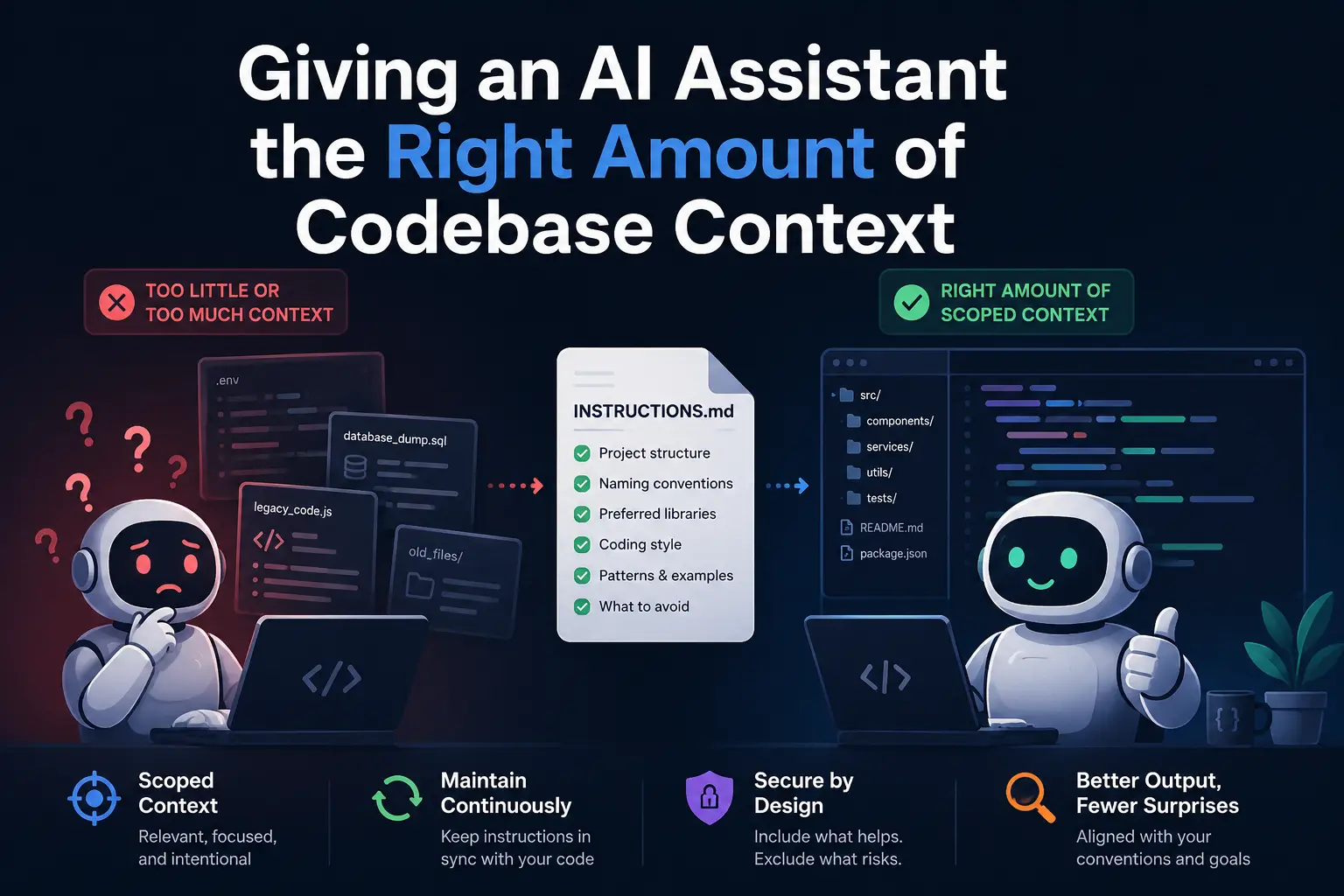
An assistant that keeps generating code technically correct in isolation but wrong for your codebase is not being careless. It has no context about your conventions unless something has actually given it that context, and the fix is a scoped set of instruction files describing structure, naming, and conventions, not a bigger dump of raw code. More context is not automatically better context: an unscoped whole-repository or whole-schema dump adds noise the model has to sift through and, separately, raises a security question of its own about what should never be in that dump at all. Set up scoped instructions once, and then treat them as something that needs maintenance, because the failure mode that shows up later is not “it never worked,” it is “it used to work and quietly stopped.”
Why an assistant “ignores your conventions” by default
An AI coding assistant has no innate knowledge of how your specific project is organized, what your naming conventions are, which library your team prefers for a given job, or which patterns are deliberate versus accidental. Absent an instruction telling it otherwise, it generates code that is plausible in general, drawing on patterns common across the code it was trained on, rather than code that matches your project specifically. This is not a defect to route around with a better prompt each time. It is the default state of a tool with no persistent memory of your codebase’s particular decisions, and it is fixed once, at the project level, rather than re-explained in every conversation.
Setting it up: naming, structure, and tool-specific instruction files
Organize the codebase itself for legibility, not just for the assistant. Clear folder hierarchies, descriptive file and function names, README files at the package level, and comments that explain the non-obvious reasoning behind a decision all give an assistant (and a human joining the project) the same signal about intent. A codebase that is hard for a new engineer to navigate is equally hard for a model to build accurate context from.
Use the tool’s dedicated instruction mechanism rather than repeating conventions in every prompt. GitHub Copilot supports custom instructions set globally, per language, or per repository through a .github/copilot-instructions.md file, covering coding style, preferred libraries, and project-specific conventions. Cursor offers a Rules for AI system that can be scoped to specific file paths or types, giving finer control over how the assistant behaves in different parts of a codebase, for instance a different rule set for test files than for application code. Both are configured as of 2026-07-28; check the current mechanism name and file location against the tool’s own current documentation before relying on this, since assistant configuration surfaces change on the same release cadence covered elsewhere in this cluster.
Set up context retrieval that finds the relevant code, not just the file you have open. Embeddings-based indexing lets an assistant locate the actual function, class, or dependency relevant to a request rather than reasoning only from whatever is visible in the current editor tab. This matters more as a codebase grows past the size a human would casually keep in their head.
The failure mode nobody warns about: context drift
The setup above solves the problem once. It does not solve it permanently, because the codebase keeps changing after the instruction files are written and the instruction files, left alone, do not. Context drift is the progressive divergence between what an instruction file says the codebase does and what the codebase actually does now, and it is described as the primary reason teams that start with solid context engineering see assistant output quality degrade over months rather than staying steady. The instruction file still says “we use library X for this,” the team migrated to library Y two months ago, and the assistant keeps confidently suggesting the pattern that used to be correct.
The practical fix is treating instruction and context files as code: they get reviewed and updated in the same pull requests that change the conventions they describe, rather than being written once during setup and left untouched. A convention change that is not reflected in the instruction file is a convention change the assistant will not know about, and a change that passes tests while quietly not matching an implicit convention is exactly the kind of subtly wrong output that missing or stale context tends to produce.
What to leave out
Scoping context down is not only about relevance to the task. It is also where this question meets a security boundary rather than just a noise problem: an entire .env file, a full database schema dump, or broad access to files with no bearing on the current task is unscoped context in the worst sense, and what to specifically exclude from an assistant’s context for security reasons is covered as its own piece rather than repeated here. The overlap is real: better-scoped context is both a quality fix and a security fix, arrived at from two different directions.
None of this replaces the review discipline that catches what slips through anyway. The ten-point checklist for merging AI-written code still applies to a change written with excellent context just as much as one written with none, because context reduces the rate of certain mistakes without eliminating the need to check for them.
FAQ
Do I need to rewrite my instruction files every time I make a small change?
No. The maintenance burden scales with how significant the convention change is, not with every commit. A genuine shift in a library, pattern, or architectural decision belongs in the instruction file at the time it happens; small implementation details usually do not need a dedicated entry.
Is more context always better for output quality?
No. Unscoped or excessive context adds noise the model has to sift through to find what is actually relevant, and can include material, credentials in particular, that should not be in an assistant’s context regardless of whether it helps output quality.
Does this differ meaningfully between GitHub Copilot, Cursor, and Claude Code?
The specific mechanism and file location differ by tool, and each should be checked against the tool’s own current documentation rather than assumed to be identical, but the underlying principle, scoped and maintained project context beats an unscoped dump or no context at all, applies across the category.
How do I know if context drift is the reason my assistant’s output quality has gotten worse?
A useful signal is the assistant confidently suggesting a pattern, library, or convention the team has since moved away from. That specific symptom, correct in the past and wrong now, points at stale context rather than a general quality problem with the tool.
Should context files live in the same repository as the code they describe?
Keeping them in the same repository, reviewed through the same pull request process as the code changes that make them stale or current, is the practical way to keep them from drifting silently, since they are then subject to the same review attention as everything else in the codebase.