
Short answer: an LLM API key exposed in frontend JavaScript is readable by every visitor, so your code should never call an LLM provider straight from the browser. Anything the browser downloads or sends can be read in developer tools, including a key baked into a Vite or Nuxt bundle at build time. The fix is structural: the browser talks only to your own server endpoint, and that endpoint holds the key, fixes the model, caps the output, checks who is asking and rate-limits them. Moving the key to the server is half the job. Locking down the proxy is the other half.
The reason this keeps happening is that the direct call works. It works in the demo, it works in the pull request, and it keeps working right up until someone opens the Network tab. Nothing in the browser warns you, and nothing at the provider can tell a request from your page apart from a request from a stranger holding the same key.
Why a browser cannot keep a secret
Frontend JavaScript runs on the visitor’s machine. They can read every file it loads, pause it in the debugger, and inspect every request it sends, headers included. Minification is not encryption. Splitting the key into three strings and joining them at runtime is not encryption. Moving it into a WebAssembly module is not encryption. If the browser can assemble the key to send it, the visitor can watch it being sent.
This is the version that ships more often than anyone admits:
// Do not ship this. The key ends up in the bundle and in every request.
const res = await fetch('https://api.openai.com/v1/chat/completions', {
  method: 'POST',
  headers: {
    'Content-Type': 'application/json',
    Authorization: `Bearer ${import.meta.env.VITE_LLM_API_KEY}`,
  },
  body: JSON.stringify({ model: 'your-model-id', messages }),
});
It looks tidy because the key comes from an environment variable. That tidiness is the trap.
How an LLM API key gets exposed in the frontend without anyone noticing
Build tools copy some environment variables into client code on purpose, and the naming convention is the only thing standing between a config value and the public. Vite’s own documentation on env variables (read September 24, 2026) states that “Variables prefixed with VITE_ will be exposed in client-side source code after Vite bundling” and warns that they “should not contain sensitive information such as API keys.” Nuxt draws the same line inside runtimeConfig: its docs (read the same day) describe top-level keys as “only available within server-side” and keys under public as “also exposed to the client-side.” One line in the wrong block, and the key is in the bundle.
The other common routes:
- A prototype that became production. The direct call was fine on localhost with a throwaway key. Then the component shipped.
- An AI coding assistant that wrote the shortest working version. Ask for “call the model from this Vue component” and the quickest answer is often exactly the snippet above. The same caution applies to what your assistant can see and do with your keys while it writes that code.
- A mobile or desktop app. A compiled app is still a client. Anyone can unpack it.
Check your own build in two minutes. Run the production build, then search the output for the first few characters of your real key:
npm run build
grep -rl "first-8-chars-of-your-key" dist/
Then open the deployed page, open the Network tab, and filter by your provider’s domain. If the browser sends any request directly to the provider, the credential for that request is in the browser.
The fix: the browser talks to you, you talk to the provider
The browser sends the user’s message to an endpoint on your own domain. That endpoint reads the key from the server environment, builds the provider request itself, and returns only the reply. The example below is plain PHP and targets PHP 8.1 or later with the curl and apcu extensions enabled. The request body follows OpenAI’s Chat Completions format; if your provider uses a different shape, change the payload and keep everything around it.
<?php
// public/api/chat.php
// Targets PHP 8.1+ with the curl and apcu extensions enabled.
declare(strict_types=1);

session_start();
header('Content-Type: application/json');

function fail(int $status, string $message): never
{
    http_response_code($status);
    echo json_encode(['error' => $message]);
    exit;
}

if ($_SERVER['REQUEST_METHOD'] !== 'POST') {
    fail(405, 'POST only.');
}

// 1. Who is asking? Your login code sets this; anonymous callers stop here.
$userId = $_SESSION['user_id'] ?? null;
if ($userId === null) {
    fail(401, 'Sign in to use the assistant.');
}

// 2. Did the request come from your own page?
$sent = $_SERVER['HTTP_X_CSRF_TOKEN'] ?? '';
if (!isset($_SESSION['csrf_token']) || !hash_equals($_SESSION['csrf_token'], $sent)) {
    fail(403, 'Invalid request token.');
}

// 3. How often? A fixed window: 20 requests per user per 10 minutes.
$bucket = 'llm_rl_' . $userId . '_' . intdiv(time(), 600);
apcu_add($bucket, 0, 600);
$count = apcu_inc($bucket);
if ($count === false || $count > 20) {
    fail(429, 'Too many requests. Try again in a few minutes.');
}

// 4. What may the browser send? One string, length-capped.
$input = json_decode((string) file_get_contents('php://input'), true);
$message = is_array($input) && is_string($input['message'] ?? null)
    ? trim($input['message'])
    : '';
if ($message === '' || strlen($message) > 4000) {
    fail(422, 'Message must be between 1 and 4000 bytes.');
}

// 5. Everything else is decided here, never by the browser.
$apiKey = getenv('LLM_API_KEY');
$model  = getenv('LLM_MODEL');
if ($apiKey === false || $apiKey === '' || $model === false || $model === '') {
    fail(500, 'The assistant is not configured.');
}

$payload = [
    'model'    => $model,
    'messages' => [
        ['role' => 'system', 'content' => 'Answer questions about our product documentation only.'],
        ['role' => 'user', 'content' => $message],
    ],
    'max_completion_tokens' => 500,
    'safety_identifier'     => hash('sha256', 'your-app:' . $userId),
];

$ch = curl_init('https://api.openai.com/v1/chat/completions');
curl_setopt_array($ch, [
    CURLOPT_POST           => true,
    CURLOPT_RETURNTRANSFER => true,
    CURLOPT_TIMEOUT        => 30,
    CURLOPT_HTTPHEADER     => [
        'Content-Type: application/json',
        'Authorization: Bearer ' . $apiKey,
    ],
    CURLOPT_POSTFIELDS     => json_encode($payload, JSON_THROW_ON_ERROR),
]);
$raw    = curl_exec($ch);
$status = curl_getinfo($ch, CURLINFO_RESPONSE_CODE);

if ($raw === false || $status !== 200) {
    error_log('LLM call failed: HTTP ' . $status . ' ' . curl_error($ch));
    fail(502, 'The assistant is unavailable. Try again shortly.');
}

$data  = json_decode($raw, true);
$reply = $data['choices'][0]['message']['content'] ?? null;
if (!is_string($reply)) {
    fail(502, 'The assistant returned an unexpected response.');
}

echo json_encode(['reply' => $reply]);
The page that renders your chat box creates the CSRF token once per session and prints it where the script can read it:
<?php $_SESSION['csrf_token'] ??= bin2hex(random_bytes(32)); ?>
<meta name="csrf-token" content="<?= htmlspecialchars($_SESSION['csrf_token']) ?>">
And the browser side shrinks to a call to your own domain, with no key, no provider URL and no model name anywhere in it:
async function askAssistant(message) {
  const token = document.querySelector('meta[name="csrf-token"]').content;
  const res = await fetch('/api/chat.php', {
    method: 'POST',
    credentials: 'same-origin',
    headers: { 'Content-Type': 'application/json', 'X-CSRF-Token': token },
    body: JSON.stringify({ message }),
  });
  const data = await res.json();
  if (!res.ok) throw new Error(data.error ?? `Request failed with ${res.status}`);
  return data.reply;
}
Two details in the PHP are easy to skip and worth keeping. The provider’s raw error body is logged, never forwarded, because it can carry account details you would rather not hand to a visitor. And the key never appears in a log line, only the status code.
The proxy is the new key
This is the part most guides stop short of. A proxy that accepts model, messages and max_tokens from the browser and forwards them unchanged has not protected anything. The key is hidden, but anyone who finds your endpoint in the Network tab can use every capability the key has, on your bill, without ever seeing it. You have built an open relay with extra steps.
The rule that fixes it: the browser supplies the user’s words and nothing else. Every other field is the server’s decision.
| Field | Who decides | What goes wrong if the browser decides |
|---|---|---|
| API key | Server environment only | Direct exposure, the problem you started with |
| Model | Server | A caller picks your most expensive model for every request |
| System prompt | Server | Your endpoint becomes a free general-purpose chatbot |
Output cap (max_completion_tokens) | Server | No ceiling on the size of any single response |
| User message | Browser, length-checked | Nothing, as long as the server caps its size |
| Who is asking | Server session | Anonymous callers script your endpoint |
| How often | Server rate limit | One account runs up the bill overnight |
OpenAI’s API reference describes max_completion_tokens as “an upper bound for the number of tokens that can be generated for a completion.” Other providers name that field differently, so check yours; the principle does not change. The safety_identifier field comes from OpenAI’s Safety best practices guide (read September 24, 2026), which recommends a string that uniquely identifies each user and says to “Hash the username or email address in order to avoid sending us any identifying information.” That is why the example sends a SHA-256 hash of the user ID rather than the ID itself.
The APCu counter is honest about its limits too. It lives in one server’s memory, so it resets on restart and is not shared across several web servers. On more than one machine, move the same counter to Redis or a database table keyed on the user ID.
CORS, nonces and other things that are not access control
Three protections get mistaken for authentication on proxy endpoints.
CORS controls which origins a browser will let read your response. It does nothing to curl, a script or a server, and none of them send an Origin header you are obliged to believe. If you have ever fought a CORS error on localhost, you have seen that the browser enforces it, not your server.
A CSRF token or a WordPress nonce proves the request came from a page you rendered. It says nothing about whether the person holding that page should be allowed to spend your money, which is the distinction behind why nonces are not authentication. Keep the token and check the session as well.
In WordPress, the proxy belongs in a REST route whose permission_callback checks a real capability or at least is_user_logged_in(). A route registered with __return_true is the same open relay with a nicer URL, and building a custom REST endpoint without leaving a hole open walks through doing it properly.
Backstops that limit the damage when something slips
None of these make a browser-side key safe. They shrink the blast radius when a mistake gets through.
- A spend limit at the provider. OpenAI’s Production best practices guide (read September 24, 2026) says “To enforce a monthly cap, set a hard spend limit,” and notes that a hard limit stops API traffic when it is reached. That stop is the point, and it is also an outage, so decide deliberately where to set it.
- Keys that expire. The same guide says “We strongly recommend setting an expiration date when you create a project API key and establishing a regular key rotation process.”
- One key per environment. A development key that leaks from a prototype should not be able to touch production.
The one legitimate browser case: short-lived tokens your server mints
Realtime voice and similar features sometimes need the browser to connect to the provider directly. The pattern OpenAI documents for its Realtime API in the Safety best practices guide is an ephemeral client secret created on the server side: your backend, holding the real key, asks for a short-lived credential and hands only that to the browser. The real key still never leaves the server, and your server still decides who gets a token. If your provider does not document a short-lived token for the endpoint you are calling, there is no browser-safe option for that endpoint. Build the proxy.
If the key has already shipped
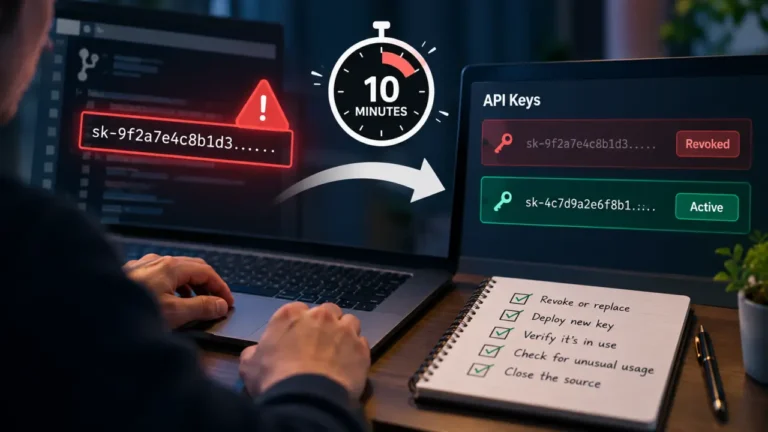
Treat it as compromised, even if you see no strange usage yet. The Safety best practices guide says: “If you believe an API key has been exposed, misused, or otherwise compromised, revoke it promptly and replace it with a new key.” Removing the line from your code does not undo the exposure, because old bundles live on in caches and in anyone’s saved copy. Revoke first, put the new key only in the server environment, deploy the proxy, and then read your usage history for anything you did not send.
FAQ
Is it safe to put an LLM API key in a Vite or Nuxt environment variable?
Only in a variable the client never receives. In Vite, anything prefixed VITE_ is bundled into client code, and the Vite docs warn against putting API keys there. In Nuxt, a top-level runtimeConfig key stays on the server, while anything under runtimeConfig.public reaches the browser.
Can I hide the key with obfuscation or by splitting it into pieces? No. The browser has to reassemble the key to send it, and the finished value appears in the request headers in the Network tab. Obfuscation only slows down the first person who looks.
Do I need a full backend, or will a serverless function work? A serverless or edge function works, and Vite’s own docs point to backend servers or serverless functions for secrets. What matters is not where the code runs but that it holds the key, fixes the model and output cap, and checks who is calling.
Does a spend limit make a frontend key acceptable? No. A spend limit caps the damage in dollars, but everyone who finds the key can still use it until the cap is hit, and hitting the cap takes your own feature offline. It is a backstop, not a boundary.
Can I keep calling the provider from the browser if I only use a cheap model? The model you intend to call is not the model an attacker will call. Whoever holds the key chooses the model, the prompt and the output length, which is exactly why those decisions belong on your server.