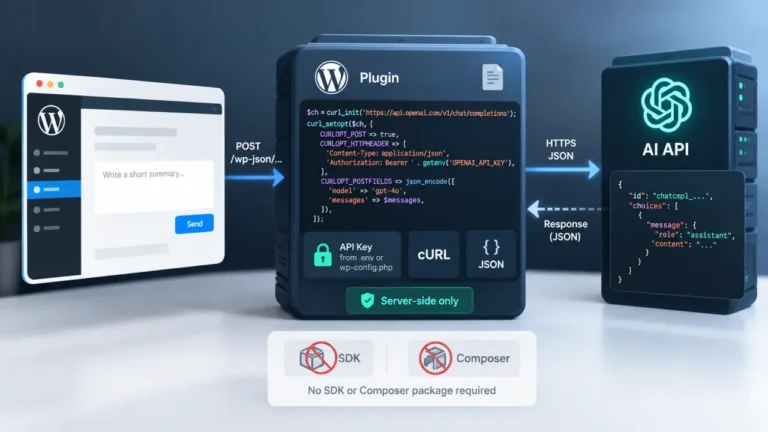
The short answer: a PHP application’s API key environment variable belongs in the server’s environment, not in a file that ships with your code. Set it through your host’s environment configuration or a .env file kept outside version control, read it with getenv() or $_ENV, and check for a missing value before the first request goes out. It never belongs in a committed PHP file, a JavaScript bundle, a URL, a log line, or a database column your admin screens can echo back unescaped.
That single decision, environment instead of source file, is the one most integrations get right in the first ten minutes and wrong somewhere else six months later, usually in a debug log nobody thought to check.
What “environment variable” actually means here
An environment variable is a value the operating system or the web server hands to your PHP process at request time. It is not part of your code, and it is not part of the files your deployment ships. Two files never see it: your repository and your build output. That separation is the entire point. A key that lives outside the codebase cannot leak through a git clone, a public repository search, or a copy of your project shared with a contractor.
In local development, most PHP developers store the value in a .env file at the project root, loaded by a library at boot time, and let their hosting platform inject the same variable directly at the process level in staging and production. The mechanism differs by environment; the destination, getenv() or $_ENV, stays the same. Use a different key per environment where the provider supports it, so a development key leaking never puts your production key at risk.
Setting it up: three places it can come from
| Where the value comes from | Typical use | Committed to git? |
|---|---|---|
.env file, loaded by a library at boot | Local development | Never |
Host or platform environment settings (panel, container config, .htaccess SetEnv) | Staging and production | N/A, not a file |
| A dedicated secrets manager (cloud provider’s own service) | Teams with multiple services and rotation requirements | N/A, not a file |
For most single-application PHP projects, a .env file plus host-level environment variables in production covers the need without adding a secrets manager. A minimal .env entry looks like this:
OPENAI_API_KEY=replace-with-your-own-key-from-the-provider-dashboardThat value is a placeholder, not a working key. Whatever string you paste there came from your own account on the provider’s dashboard, and it should never be typed into a chat, a ticket, a code review comment, or a shared document once it exists.
The file that loads it should sit at the project root and be excluded from version control on day one, before the first real key is ever pasted in:
# .gitignore
.env
A .env.example file with the variable names but no real values is fine to commit, and it is what a teammate or a future you copies to create the real file. The distinction that matters is values versus names: names in git, values never.
Reading the API key environment variable safely in PHP
Once the environment holds the value, getenv() is the direct way to read it back. PHP’s own manual page for getenv() (read 2026-09-18) documents the current signature as getenv(?string $name = null, bool $local_only = false): string|array|false, and it returns false when the named variable does not exist.
$api_key = getenv( 'OPENAI_API_KEY' );

if ( false === $api_key || '' === $api_key ) {
    // Fail loudly here, at startup, not three requests later
    // when a provider call returns an authentication error.
    throw new RuntimeException( 'OPENAI_API_KEY is not set.' );
}
That check for false is not defensive programming for its own sake. An application that silently sends an empty string as a key produces a confusing authentication error from the provider instead of a clear message from your own code, and the confusing version is the one that gets debugged at the worst possible time.
The PHP manual also notes a detail worth knowing if your host runs PHP under a SAPI such as FastCGI: getenv() returns the SAPI-set value even when putenv() set a different one locally. If a value seems to update everywhere except the one place you just changed it, that mismatch is a common cause. $_ENV is the array-access alternative and behaves the same way once a loader has populated it; pick one and use it consistently across the codebase rather than mixing both.
One honest limit worth naming: an environment variable is not encryption. It sits in plain text, readable by anything running as the same server user, including a misconfigured error handler or a colleague’s debugging script. That is still a large improvement over a key sitting in source control, but it is why teams with more than one service or a compliance requirement layer a dedicated secrets manager on top rather than treating the environment variable as the final word.
Every place it must not go
This is the list that actually gets checked in a code review, and each line is a real way a key has left a codebase before.
- Not hardcoded in a PHP file that gets committed. A string literal in a file under version control is in your git history forever, even after you delete the line in a later commit. Removing the line is not removing the exposure.
- Not in a JavaScript file sent to the browser. Anything bundled for the frontend is readable by anyone who opens their browser’s developer tools. A key does not need to be printed to the page to be exposed; being present in a file the browser downloads is exposure on its own.
- Not in a URL, including a query string. URLs end up in server access logs, browser history, and sometimes a proxy’s own logs, none of which are places a secret should sit even briefly.
- Not in an error message or a debug log. A
var_dump()or an uncaught exception that includes the request payload can put the key into a log file that a much wider group of people can read than the people who should ever see it. - Not in an unescaped admin field. If your application stores the key in a database column so an admin screen can display or edit it, that value needs the same output escaping as any other stored data before it reaches the page, the same discipline covered in choosing which function sanitizes input, which validates it, and which escapes it for output, because a key rendered back into an HTML page without escaping is one more way it ends up visible where it should not be.
- Not pasted into a support ticket, a shared document, or a screenshot. This one has nothing to do with code and everything to do with habit. If a key has been typed anywhere outside the environment it lives in, treat it as seen and rotate it rather than assuming the copy was private.
If your application is a WordPress plugin
The advice above holds regardless of framework, but one WordPress-specific trap is common enough to name directly: pasting the key straight into functions.php. That file lives in the active theme, it is exactly the kind of file a well-meaning developer edits directly on a live site, and a typo in it takes the whole site down along with the key sitting inside it, which is one more reason editing functions.php directly causes so many white-screen incidents.
If the integration is going to live inside WordPress at all, give it its own plugin with its own bootstrap file rather than folding it into theme code, following the file and header structure a plugin actually needs, and load the environment check on a hook that runs early enough to fail before anything else depends on the key, which is the same timing question addressed in picking the right hook for the job. None of that changes where the value itself is stored: still the server environment, never a constant defined in a file that ships with the plugin.
Checking whether a key already got into your repository
If you are reading this after the fact rather than before writing the first line, check your git history before doing anything else. A key that was committed and later deleted from the current file is still sitting in every earlier commit, and anyone with clone access to that history, past or present, can find it with a simple search through the log. The fix at that point is not editing the file again. It is rotating the key at the provider so the old value stops working, then confirming the new value only exists in the environment, never in a commit.
As OpenAI’s own Production Best Practices guide (read 2026-09-18) puts it, keys should be exposed to an application through environment variables or a secrets manager specifically so they never need to be hard-coded into a codebase, and they should never be shared, deployed client-side, or committed to a repository in the first place.
The short version
- The key lives in the server’s environment: a
.envfile kept out of git locally, host-level environment variables in production. - Read it with
getenv()or$_ENV, and check for a missing or empty value before the first request that depends on it. - It never belongs in a committed file, a browser-bound script, a URL, a log line, or an unescaped admin field.
- An environment variable is not encryption; a secrets manager is the next step once one service or one key stops being enough.
- A key that has already been committed, logged, or pasted somewhere outside the environment should be rotated, not just moved.
FAQ
What is the difference between getenv(), $_ENV and $_SERVER in PHP?
getenv() is a function call that asks the operating system or SAPI for a named variable and returns false if it is not set. $_ENV and $_SERVER are superglobal arrays that a loader library or the SAPI populates with the same kind of values. Which one holds your variable depends on how it was set and which loader your project uses; pick one approach and use it consistently rather than checking all three in different places.
Can I just define the API key as a PHP constant in wp-config.php instead of an environment variable?
wp-config.php sits above the web root on most hosts and is not served publicly, which makes it a safer location than a plugin or theme file, but it is still a file in your codebase or backup that can end up in version control, a support ticket, or a shared archive if someone is not careful. An environment variable set at the host or server level keeps the value out of every file entirely, which is the stronger guarantee.
Is it safe to commit a .env.example file to git?
Yes, as long as it contains only variable names with placeholder text, never a real value. .env.example is what a teammate copies to create their own .env file; the real .env file itself should never be committed.
Do I need a secrets manager, or is a .env file enough?
For a single application with one or two people managing keys, a .env file locally plus host-level environment variables in production is generally enough. A secrets manager earns its complexity once you have multiple services, multiple environments, or a requirement to rotate keys on a schedule without redeploying code by hand.
What should my code do if getenv() returns false for the API key?
Fail immediately and clearly, before the application tries to make a request with a missing key. A thrown exception or a startup check that stops the application with a plain message is far easier to diagnose than an authentication error from the provider three steps into a request that never had a real key to begin with.