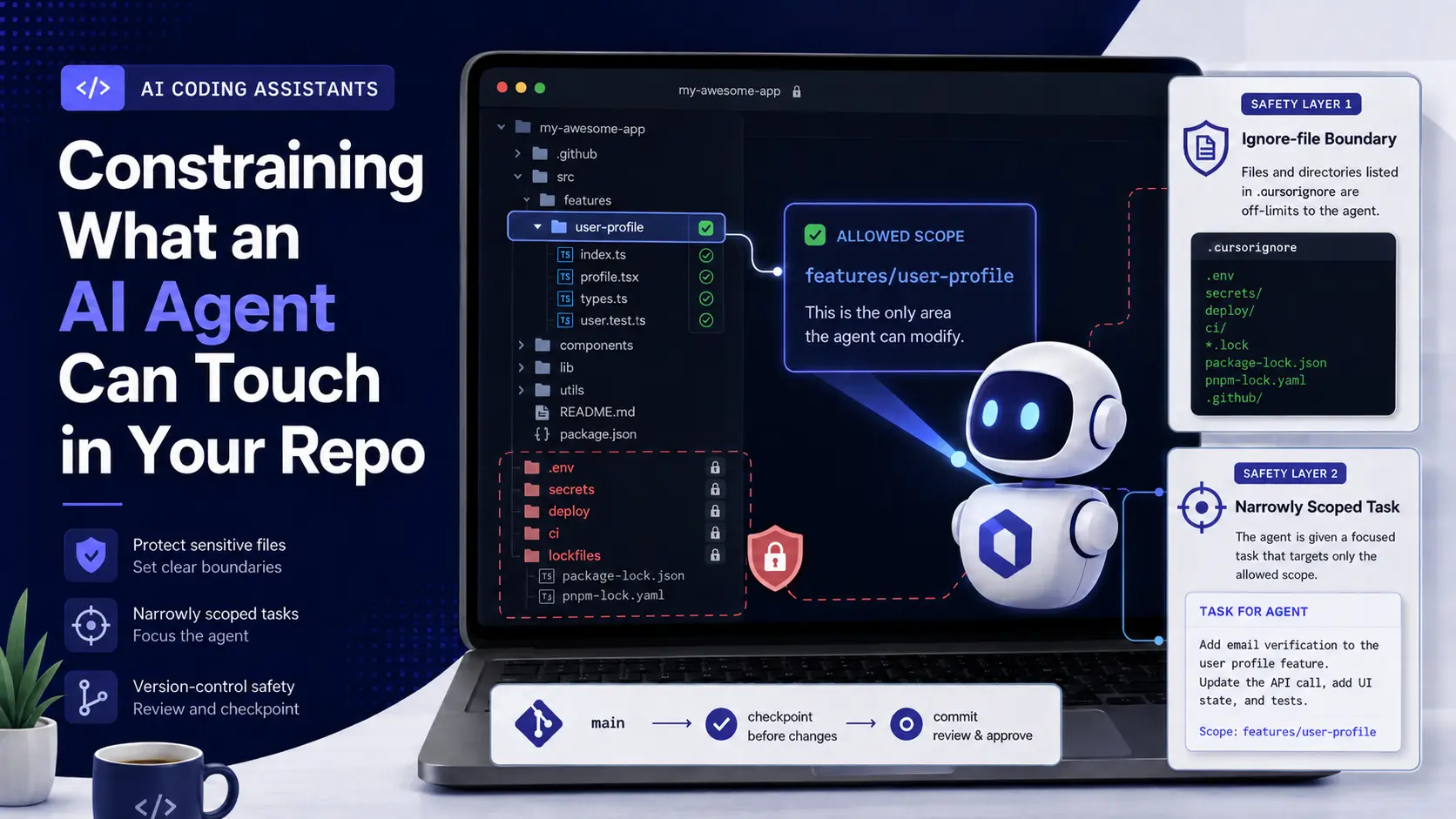
Two layers together keep an AI coding agent from rewriting a file it should never touch: an ignore-file boundary that tells the tool what not to read, and a narrowly scoped task that tells it what it is actually there to do. Neither one alone is a reliable perimeter. An ignore file only stops the agent from reading a file through its normal file-access path; a shell command inside the same agent session can still reach around it. The scoped task is what actually determines whether the agent has a reason to touch a config file in the first place. Commit your work before letting an agent run unattended or on a broad task, so that if either layer fails, undoing the damage is one command away.
A verified backup step, stated before anything else in this piece: none of what follows here involves a destructive command. But the practice this piece assumes throughout (a clean, committed working tree before an agent session that has broad file access) is the actual safety net if a boundary does not hold, and it costs nothing to keep.
Why “the AI rewrote my config” is usually a scope failure, not a rebellion
When an agent modifies a file it was not asked to touch, the instinctive read is that the tool ignored a boundary. Most of the time the more accurate read is that the request itself did not have a boundary narrow enough to exclude that file. An agent asked to “fix the build” with no further constraint has no way to know that touching package.json is out of bounds if the build genuinely looks broken because of a dependency version. The fix in that case is not a stronger warning to the tool; it is a task that states what is and is not in scope, the same discipline covered for prompting a reviewable change in general.
File-access restriction exists for the narrower, more serious case: files the agent should never touch regardless of how the task is scoped, because a mistaken edit there is expensive or dangerous. Secrets files, deployment credentials, and CI/CD configuration sit in this category, and what specifically must never enter an assistant’s context in the first place is its own question, covered fully there rather than repeated here.
Setting up an ignore file
Cursor supports a .cursorignore file at the project root, following the same syntax as .gitignore, and it is read by the agent to exclude matching paths from what it can access. The equivalent mechanism differs by tool: GitHub Copilot’s custom-instructions file and Claude Code’s permission and settings configuration serve a related purpose but are not identical in syntax or guarantee, and each should be checked against that tool’s own current documentation rather than assumed to work the same way .cursorignore does.
What belongs in the ignore list, regardless of which tool’s syntax you are writing it in: environment files (.env and its variants), any file containing an API key, token, or credential, deployment and infrastructure configuration, and lockfiles you do not want touched incidentally by an unrelated task. Exclude noisy, irrelevant directories too (build artifacts, dependency folders, and generated output) not for security but because they add nothing useful to what the agent needs to see and only increase the chance of an irrelevant, unreviewed change.
The honest limit: this is best-effort, not a sandbox
An ignore file changes what the agent’s normal file-reading path can see. It does not create a hard security boundary. Cursor’s own documentation is explicit that .cursorignore is best-effort, not a guarantee, given the inherent unpredictability of a language model deciding what to do next, and a documented case exists of an agent bypassing a file restriction by using an available shell command to read a file it had been told to ignore rather than reading it directly. An agent with terminal access is not meaningfully sandboxed by a file-visibility list alone.
The practical consequence: treat an ignore file as one useful layer among several, not the whole answer. Tool allowlists that restrict which shell commands an agent may run, and running the agent under a user or process with restricted filesystem permissions in the first place, are the layers that actually hold when the ignore file does not. Defense in depth is not a slogan here; it is the direct, documented answer to “what happens when the polite boundary is bypassed.”
The precondition that actually matters more than any single tool setting
Every layer above reduces the odds of an unwanted change. None of them eliminates it entirely, and that is the reason a clean, committed working tree before a broad or unattended agent session is not optional advice, it is the actual recovery mechanism. If an agent modifies a file it should not have, the fix is git diff against the last commit, reviewing exactly what changed, and reverting the specific unwanted lines, which is only fast and safe if there was a clean commit to compare against. Running a long agent session against an already-messy, uncommitted working tree turns every one of these questions from “what did the agent change” into “what changed, by whom, and when,” which is a much harder question to answer under pressure.
None of this replaces reading the diff once the session ends. A change that stayed inside every permission boundary can still be the kind of plausible-but-wrong code this cluster’s merge checklist exists to catch; scoping access reduces what can go wrong, it does not remove the need to check what actually did.
FAQ
Does .cursorignore stop the agent from ever seeing an excluded file’s contents?
It stops the agent’s normal file-reading tools from returning that file’s contents. It does not guarantee the agent cannot reach the same content through another available tool, such as a shell command, which is why it is described as best-effort rather than a hard block.
Should secrets ever be readable by a coding agent at all?
No. Secrets belong in an environment variable or secrets manager the agent’s process does not have read access to, not in a file that is merely excluded by name: an ignore-list entry is a convenience layer, not the actual security boundary for a credential.
Is a narrower task or a stricter ignore file more effective at preventing unwanted edits?
They address different failure modes and both matter: a narrow task reduces the odds the agent has any reason to touch a sensitive file; the ignore file is the layer that matters when a broad or ambiguous task creates that reason anyway.
Do these mechanisms differ between GitHub Copilot, Cursor and Claude Code?
The specific configuration file and syntax differ by tool and each should be checked against that tool’s own current documentation, but the same two-layer principle, boundary plus scoped task, plus a committed working tree as the actual recovery path, applies across all three.
What is the single most important habit here?
Committing before a broad or unattended agent run. Every other layer reduces risk; a clean commit is what actually lets you undo the outcome cheaply and precisely if one of those layers does not hold.