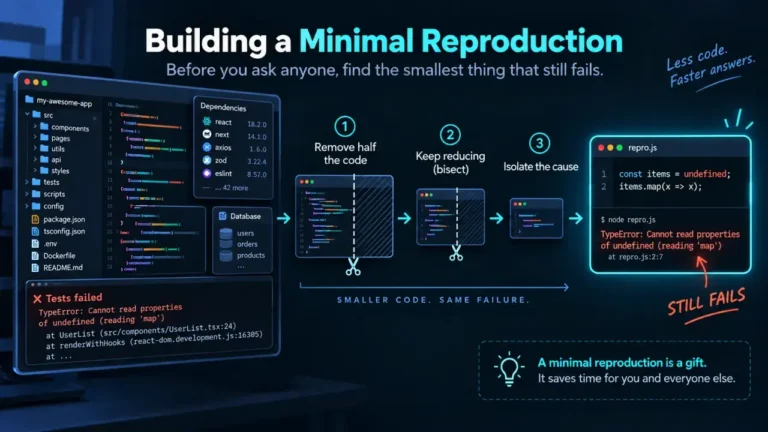
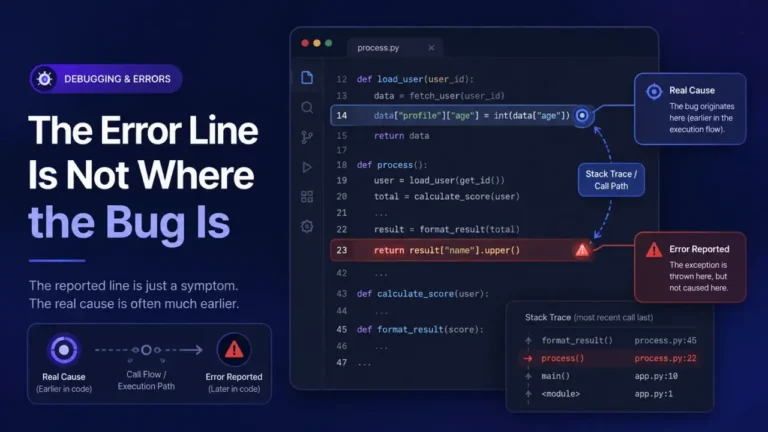
TypeError: Cannot read properties of undefined (reading 'name') means the code tried to access a property called name on something that turned out to be undefined at that exact moment. JavaScript tells you the property, name, but not which object was missing, and if the failing line is user.profile.name, any of user, user.profile, or the value stored under profile could be the thing that is actually undefined. The fix is never the error message itself, it is finding which link in the chain broke, which is usually one of four causes: data that has not arrived yet, a shape mismatch between what you expected and what you got, an empty array on first render, or a DOM reference that does not exist yet. Each is covered below with the fix, followed by the one diagnostic step that most guides skip: how to find out which link actually failed before you touch a single line of code.
What the error actually means
JavaScript objects are checked for a property at read time, not at write time. There is no compile step that would have caught user.profile.name failing because user.profile does not exist; the check only happens when that line of code runs. The error message names the property being read (name) and the operation (reading), but the identifier in front of it, user.profile, is not printed anywhere in the message. That is the whole reason this error is confusing: it tells you what you were looking for, not where you were looking.
The four common causes, ranked
1. Data that has not arrived yet (most common)
A component renders before an async fetch or API call has resolved. On the first render, the variable holding the response is still undefined, null, or an empty default, and the code that reads a property off it runs anyway.
function UserCard({ user }) {
  return <p>{user.name}</p>; // fails on the render before `user` is fetched
}
Fix: guard the render until the data exists, either with a loading state or a short-circuit:
function UserCard({ user }) {
  if (!user) return <p>Loading...</p>;
  return <p>{user.name}</p>;
}
2. A shape mismatch between what you expected and what the API sent
The response came back, but its structure is not what the code assumes. A renamed field, a nested object that got flattened, or an error response with a different shape than the success response are the usual reasons. This is where Unexpected Token in JSON at Position 0 and this error tend to show up together: the response parsed fine as JSON, it just was not the JSON the code expected.
Fix: log the raw response once, compare it field by field against what the code reads, and fix the read, the request, or the backend, whichever is actually wrong.
3. Mapping or destructuring over an array that starts empty or undefined
data.items.map(...) fails if data.items has not been set yet, which is common when the initial state is {} rather than { items: [] }.
Fix: initialize state with the shape the rest of the code expects, empty arrays and empty objects rather than undefined, so the first render has something safe to read.
4. A DOM or ref value read before the element exists
Reading elementRef.current.value before the element has mounted, or inside an event handler that fires after the element was removed, produces the same error with a DOM property name instead of a data property name.
Fix: confirm the ref is set (if (elementRef.current)) before reading from it, and double-check the handler is not still attached after the element unmounts.
Finding which link in the chain is undefined
This is the step most guides skip, and it is the actual bottleneck when the chain has more than one link, like user.profile.address.city. Optional chaining (user?.profile?.address?.city) makes the crash go away, but it does not tell you which link was the problem, it just stops asking once it hits the first undefined one. That is fine once you understand the bug. It is not a diagnosis.
To find the actual break point, split the chain into its own lines and log each intermediate value before the whole thing crashes again in the same way:
console.log('user:', user);
console.log('user.profile:', user?.profile);
console.log('user.profile.address:', user?.profile?.address);
Whichever line logs undefined first is the actual break point. In a browser DevTools debugger, the same thing is faster with a breakpoint on the failing line and hovering each identifier left to right, since DevTools will show the live value of user, then user.profile, then user.profile.address without editing any code. Once you know which link is undefined, you know which of the four causes above you actually have, rather than guessing.
Optional chaining paired with a fallback (user?.profile?.address?.city ?? 'Unknown') is the right permanent fix once you understand why the chain breaks. Optional chaining alone, with no fallback and no investigation, usually just moves the bug from a crash to a silently blank field, which is harder to notice and harder to debug later.
Preventing it from recurring
- Initialize state with the final shape you expect (empty array, empty object), not
undefinedornull, so the first render always has something safe to read. - Add a loading or “not ready” state for anything that depends on async data, instead of assuming the data is already there.
- If you consume an external or third-party API, validate the response shape once at the boundary rather than trusting it deep inside the component tree.
- If the code producing the object was written by an AI assistant, treat an assumed property on a response object as unverified until you have actually seen the real payload; when AI-generated code passes tests and is still wrong covers the broader version of this problem, where an assistant assumes a field exists because it looks like it should.
For the general skill of reading the surrounding trace before you start guessing at causes, see Reading a Stack Trace You Did Not Write, which covers exactly this error format in its JavaScript section.
FAQ
Why does the error not tell me which variable was undefined?
Because JavaScript only tracks the property being read (name) and the fact that the read failed, not the full expression that produced the object it was reading from. The message is generated at the point of failure, and by then the identifier chain in your source code is no longer available to the error object.
Is Cannot read properties of undefined the same as Cannot read property of undefined?
They are the same underlying error. Modern V8 (Chrome, Node, Edge) uses the newer “properties” wording; older engines and some other browsers use the singular “property” phrasing. Both mean the same thing.
Does optional chaining fix the bug or just hide the crash?
It stops the crash. Whether that counts as a fix depends on what happens next: user?.profile?.name with no fallback just becomes undefined silently, which can produce a blank field or a broken layout instead of a visible error. Pair it with a fallback value or a visible loading state, and treat the underlying “why is this undefined” question as still open.
Why does this happen more often after adding an API call or async data?
Because the render function runs at least once before the async call resolves, and unless the code explicitly waits for that, it reads properties off data that has not arrived. This is the single most common cause of this error in practice.
Can TypeScript prevent this entirely?
It prevents it for values TypeScript actually knows the shape of at compile time. It cannot catch a runtime mismatch where the actual API response does not match the type you declared for it, which is why validating the real response shape still matters even in a typed codebase.