The handbook will tell you what add_action does. It will not tell you the thing that actually costs you an afternoon, which is that your callback can be perfectly correct and still do nothing, because it ran at a moment when the data it needed did not exist yet.
That failure has no error message. WordPress does not warn you that you asked a question too early. It answers with an empty value, a false, or a default, and your code proceeds confidently on it.
So the useful mental model is not a list of hooks. It is a timeline, with a note against each stage saying what exists by then. This page is that timeline.
The request, in order
A front-end request runs roughly like this. Every entry is a stage, and the italic line is the thing worth remembering about it.
| Stage | What has happened by now |
|---|---|
muplugins_loaded | Must-use plugins are loaded. No regular plugins, no theme, no user. |
| Active plugins are loaded | Every plugin file is included, top to bottom. This is when your plugin’s top-level code runs. |
plugins_loaded | The handbook: “Fires once activated plugins have loaded. Pluggable functions are also available at this point in the loading order.” Still no theme. |
setup_theme | About to load the theme. |
The theme’s functions.php is loaded | Child theme first, then parent. Anything a plugin needs from the theme did not exist before this line. |
after_setup_theme | The handbook: “called during each page load, after the theme is initialized. It is generally used to perform basic setup, registration, and init actions for a theme.” |
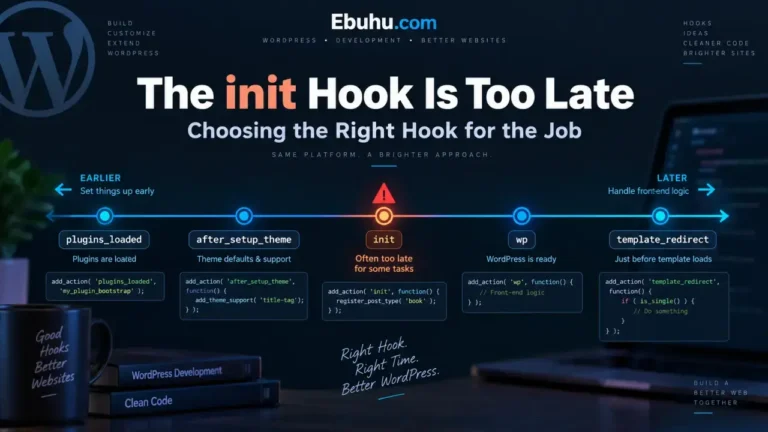
init | The handbook: “Fires after WordPress has finished loading but before any headers are sent,” and “Most of WP is loaded at this stage, and the user is authenticated.” Post types, taxonomies, sessions, $_POST handling. |
wp_loaded | Everything above is done. Use this when you need WordPress fully loaded; the handbook says init fires before complete initialization. |
parse_request, send_headers | The URL is turned into a query. |
wp | The main query has run. This is the first point where the conditional tags are trustworthy. |
template_redirect | Last chance to redirect before output. |
wp_head and asset enqueueing | The document head is being written. |
| The loop | Posts are rendered. |
wp_footer | Output is nearly done. |
shutdown | The request is over. |
You do not need to memorize it. You need to know which side of two lines you are on: is the theme loaded yet, and has the main query run yet. Almost every timing bug in WordPress is one of those two.
Line one: the theme loads after the plugins
This is the boundary people cross without noticing, because plugin code and theme code sit in different folders and feel independent.
They are not. Every active plugin is fully loaded before the theme’s functions.php is even opened. So this, in a plugin:
// In a plugin. Runs while plugins load, before the theme exists.
my_theme_helper();   // Fatal: undefined function
is not a spelling mistake, it is a timing mistake. The function is real. It is defined in the theme, and the theme has not been read yet.
The fix is to wait:
add_action( 'after_setup_theme', function () {
    if ( function_exists( 'my_theme_helper' ) ) {
        my_theme_helper();
    }
} );
The reverse direction works for free. Theme code can call plugin functions, because by the time functions.php runs, every plugin is already in memory. The dependency only goes one way, and knowing which way is most of it.
Line two: the conditional tags need the main query
This one is worse than the first, because it does not crash. It returns a wrong answer.
add_action( 'init', function () {
    if ( is_page( 'contact' ) ) {       // always false here
        wp_enqueue_style( 'contact-css' );
    }
} );
is_page() reports on the main query. On init, WordPress has not turned the URL into a query yet, so there is nothing to report on and the condition is simply false, on every page, forever. No notice, no warning, no error log entry. The stylesheet just never loads and you go looking in the wrong place.
The earliest stage where the conditional tags are reliable is wp, and for anything that produces output, template_redirect or the asset enqueueing stage is the natural home:
add_action( 'wp_enqueue_scripts', function () {
    if ( is_page( 'contact' ) ) {
        wp_enqueue_style( 'contact-css', get_stylesheet_directory_uri() . '/contact.css' );
    }
} );
This is the exact shape of a silent failure: code that runs, returns, and is wrong. It is worth recognizing as a category rather than as a WordPress quirk, because the same pattern shows up wherever generated or copied code is dropped into a lifecycle it was not written for, which is the subject of when code passes its tests and is still wrong.
Why init is the default answer, and when it is the wrong one
init is the hook most tutorials reach for, and it is a reasonable default: by then, per the handbook, most of WordPress is loaded and the user is authenticated. It is the correct home for registering post types and taxonomies, for loading translations, and for handling submitted data.
It is the wrong home in two directions.
Too late for theme feature declarations. The handbook’s own note on after_setup_theme is explicit that “the init hook is too late for some features, such as indicating support for post thumbnails.” Theme support goes on after_setup_theme.
Too early for anything about this particular request. Which page, which post, which template, whether it is a 404: none of that exists on init. And the handbook says plainly that if you need WordPress fully loaded, wp_loaded is the hook, because init fires before initialization completes.
Priority, which is the other half of “when”
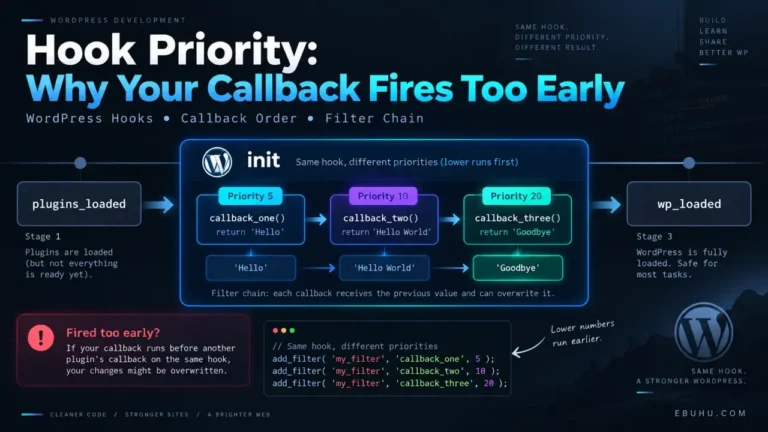
The third argument to add_action is the priority, and it defaults to 10.
add_action( 'init', 'a' );          // priority 10
add_action( 'init', 'b', 5 );       // runs first
add_action( 'init', 'c', 20 );      // runs last
Three rules cover essentially every case.
Lower runs earlier. A priority of 5 runs before 10, which runs before 20. It is not an importance ranking, it is a position in a queue.
Equal priorities run in registration order, which means the order plugins happened to load in. If your code only works at priority 10 because of what another plugin does at priority 10, it does not work, it is winning a coin toss. Move it explicitly to 9 or 11 and make the dependency visible.
A very high priority is a smell worth reading twice. add_action( 'init', 'fix_it', 9999 ) usually means “I am trying to run after something I have not identified”. Sometimes that is genuinely the only option. Often the real answer is that the work belongs on a later hook entirely, and moving it there removes the race instead of postponing it.
Actions and filters are the same machine
Worth stating once at pillar level, because it explains a category of confusion rather than a single bug.
add_action() is a thin wrapper around add_filter(). The two systems are one system, and the only real difference is what the caller does with your return value: do_action() discards it, apply_filters() uses it as the new value and passes it on.
Which produces the most common WordPress mistake in one line: a filter callback that does not return anything replaces the value with null.
add_filter( 'the_title', function ( $title ) {
    $title = strtoupper( $title );
    // no return: every title on the site is now empty
} );
No error. Empty titles. The same failure family as the conditional tag on init, from the opposite direction.
Debugging a timing problem in three moves
When something correct is not happening, do not read the callback again. Measure when it ran.
1. Confirm it ran at all.
add_action( 'init', function () {
    error_log( 'my callback fired' );
} );
If nothing appears, the registration never happened, and the problem is the file, not the hook.
2. Confirm what existed when it ran. Log the thing you assumed was there: the post id, get_current_user_id(), whether your post type is registered, whether the function you are calling exists.
3. Move it one stage later and re-measure. If the behavior changes, you have a timing bug and the timeline above tells you where it actually belongs. If it does not change, the timing was never the issue and you have eliminated it cheaply.
What this page deliberately does not cover
This is a pillar about the request lifecycle as code sees it. It is not about operating a WordPress site: updates, backups, plugin choices, the admin interface, publishing workflow and content operations are all somebody else’s ground, and code that touches a live site belongs behind a verified backup and a staging copy before any of this is applied.
The spokes go the other way, deeper into the code: actions versus filters in full, hook priority in practice, choosing the right hook for a given job, and where plugin code belongs so that a single typo does not take the site down.