Before anything below: take a backup you have actually restored from, not one you assume exists. A backup nobody has ever tested is a hope. Adding files to a live site can take the whole site down, and the moment you need the restore is the worst possible moment to discover it does not work. Do this on a staging copy if you have one.
With that said, the question this page answers is small and it decides a lot: where does site-specific code belong?
Not functions.php. A plugin.
Why the theme is the wrong home
functions.php is convenient. It exists, it runs, and every snippet site tells you to paste there. Three things go wrong with it.
It dies when the theme changes. Switch themes, and every function, hook, shortcode and custom post type registered in functions.php is gone. The content stays in the database and becomes unreachable, because nothing is registering the post type any more.
It has no on and off switch. A plugin can be deactivated from the admin, or by renaming its folder over SFTP when the admin is unreachable. Theme code cannot. When something in functions.php is fatal, the site is down and the recovery path is narrower, which is the situation described in getting an error message out of a WordPress white screen.
It mixes two concerns. Presentation belongs to the theme. A custom post type, an integration, a scheduled job and a REST endpoint are not presentation. If the site should keep behaving the same way after a redesign, the code does not belong to the design.
The rule that follows: if it should survive a theme switch, it goes in a plugin.
The minimum viable plugin
One folder and one file, in wp-content/plugins/:
wp-content/plugins/
  acme-site/
    acme-site.php
<?php
/**
* Plugin Name: Acme Site Functionality
* Description: Site-specific behavior for acme.example.
* Version: 1.0.0
* Author: Acme
* Text Domain: acme-site
* Requires PHP: 8.1
*/
if ( ! defined( 'ABSPATH' ) ) {
exit;
}Two things are doing real work here.
The header comment is not decoration. WordPress scans plugin files for that block, and Plugin Name is the field that makes the plugin appear on the Plugins screen at all. No header, no plugin. A typo in the comment syntax has the same effect.
The ABSPATH guard is not optional. Without it, anyone who requests your PHP file directly executes it outside WordPress, with none of core loaded. Put that guard at the top of every PHP file you add, not just the main one.
A layout that survives growth
The single file is fine until it is not. When it stops being fine, this shape holds up:
acme-site/
  acme-site.php          bootstrap only: header, guard, requires, hooks
  includes/
    post-types.php
    rest.php
    admin.php
  assets/
    css/
    js/
  languages/
The main file becomes a table of contents:
define( 'ACME_SITE_PATH', plugin_dir_path( __FILE__ ) );
define( 'ACME_SITE_URL',  plugin_dir_url( __FILE__ ) );

require_once ACME_SITE_PATH . 'includes/post-types.php';
require_once ACME_SITE_PATH . 'includes/rest.php';

if ( is_admin() ) {
    require_once ACME_SITE_PATH . 'includes/admin.php';
}
Use plugin_dir_path( __FILE__ ) and plugin_dir_url( __FILE__ ) rather than building paths by hand. Hard-coded wp-content/plugins paths break on any install that has moved the content directory, and there are more of those than you expect.
Naming, because collisions are silent until they are fatal
Everything you declare at the top level of PHP shares one global namespace with every other plugin on the site. Two plugins declaring get_settings() is a fatal error, and the site that goes down is the customer’s.
Pick a prefix and use it without exception: acme_get_settings(), ACME_VERSION, Acme_Settings. A real PHP namespace is better still if you are comfortable with autoloading. Either way, no unprefixed global function, class or constant, ever.
The same applies to option names, meta keys, cron hook names and database table names.
Activation, deactivation, uninstall
Three different moments, three different jobs.
register_activation_hook( __FILE__, 'acme_activate' );
function acme_activate() {
    // Create tables, set default options, flush rewrite rules.
    // Runs once, on activation only.
}

register_deactivation_hook( __FILE__, 'acme_deactivate' );
function acme_deactivate() {
    // Unschedule cron events. Do not delete user data here.
}
Deactivation is not uninstallation. People deactivate a plugin to test something and expect their data to still be there when they turn it back on. Data deletion belongs in uninstall.php in the plugin root, which runs only when the plugin is deleted from the admin.
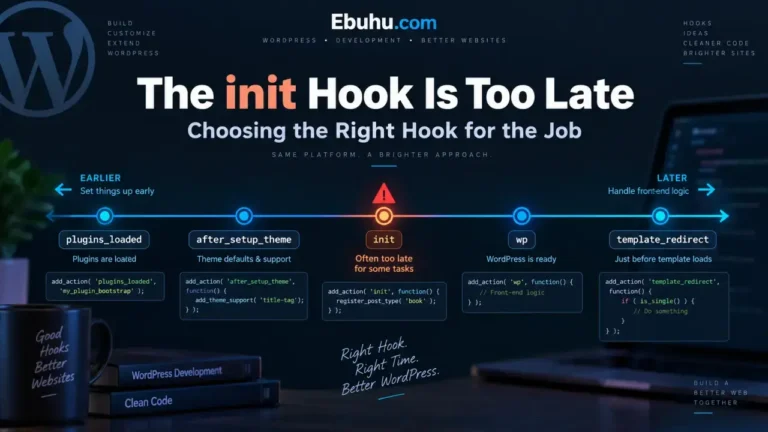
One recurring bug: registering a custom post type inside the activation hook. It does not work. Activation runs once; the post type must be registered on init on every request, or it does not exist. What belongs in activation is the rewrite rule flush that follows registration, and that ordering is a timing question of exactly the kind covered in the WordPress execution order.
Before you upload it
- The header comment parses. No
Plugin Name, no plugin. ABSPATHguard on every PHP file.- Everything prefixed. Functions, classes, constants, options, meta keys, cron hooks.
- No
?>at the end of a PHP file. A trailing newline after a closing tag is output, and output before headers is a whole category of failure you do not need. - Syntax checked before it goes near the server.
php -l acme-site.phpon every file. It costs a second and it catches the parse error that would otherwise take the site down.
Upload the folder, activate, and load the front end and the admin once each. If something is wrong, the plugin can be switched off. That is the entire reason it is a plugin.