
Short answer: in the Composer caret vs tilde version question, the caret (^1.2.3) allows every update below the next major version, so >=1.2.3 <2.0.0. The tilde allows only the last digit you wrote to rise: ~1.2.3 means >=1.2.3 <1.3.0, but ~1.2 means >=1.2 <2.0.0, the same range as ^1.2. Neither operator can stop a maintainer who ships a breaking change in a minor release. Your composer.lock file and how you run composer update are what actually protect you.
Everything below targets Composer 2.x on PHP 8.x. One flag, --minimal-changes, needs Composer 2.7 or newer.
What caret and tilde actually allow
Most explanations stop at “caret is looser, tilde is stricter.” That is only true for some of the ways you can write them. Here is the full picture, taken from the Composer documentation on versions and constraints, which we read on 2026-09-23:
| Constraint | Allowed range | What can change |
|---|---|---|
^1.2.3 | >=1.2.3 <2.0.0 | Minor and patch |
^1.2 | >=1.2.0 <2.0.0 | Minor and patch |
~1.2.3 | >=1.2.3 <1.3.0 | Patch only |
~1.2 | >=1.2.0 <2.0.0 | Minor and patch |
~1 | >=1.0.0 <2.0.0 | Minor and patch (same as ~1.0) |
^0.3 | >=0.3.0 <0.4.0 | Patch only |
~0.3 | >=0.3.0 <1.0.0 | Minor and patch |
^0.0.3 | >=0.0.3 <0.0.4 | Nothing past 0.0.3 patches |
Two rows deserve a second look.
First, ^1.2 and ~1.2 are identical. If your team argues about caret versus tilde while writing two-part versions, the argument changes nothing. Tilde only narrows the range when you give it three parts.
Second, below 1.0 the relationship flips. ^0.3 is the stricter one, and ~0.3 happily installs 0.9.0. That matters because, under the semver rules, a 0.x package promises nothing between minor versions.
The Composer docs call caret “the recommended operator for maximum interoperability when writing library code,” and composer require writes a caret constraint by default. That recommendation rests on one assumption: that the package author follows semantic versioning.
Why a caret lets a breaking change in
The caret is a promise you make on someone else’s behalf. ^1.4 says “I trust this maintainer never to break the public API before 2.0.0.” The Semantic Versioning 2.0.0 specification, which we read on 2026-09-23, defines the deal: bump MAJOR for incompatible API changes, MINOR for backward compatible functionality, PATCH for backward compatible bug fixes.
Real packages break that deal, usually by accident. A method’s return type gets tightened. A default argument changes. A class that was never marked internal gets moved. The maintainer thinks nobody used it. You did.
When that happens inside a minor release, your ^1.4 constraint accepts the new version, and nothing in Composer warns you, because from Composer’s point of view nothing is wrong. The constraint is satisfied.
The semver spec is clear about what the maintainer should do next: “fix the problem and release a new minor version that corrects the problem and restores backward compatibility.” It also says modifying an already released version is unacceptable. So the fix is coming, eventually, as a new release. Your job is to survive the gap.
The constraint did not break production. An update did.
This is the part most caret vs tilde guides skip. Composer resolves your constraints once, when someone runs composer update, and writes the exact result into composer.lock. After that, composer install reads the lock file and installs exactly those versions, ignoring how wide your constraints are.
So a breaking change reaches you through one of three doors:
- Someone ran
composer updatewith no package names, which re-resolves every dependency. composer.lockwas never committed, so every fresh install resolves from scratch.- A CI job or a deploy script runs
composer updateinstead ofcomposer install.
If you commit the lock file and deploy with composer install, a bad upstream release cannot reach production until a human updates the lock and commits it. Switching every ^ to ~ in composer.json would not have given you that protection, and for two-part versions it would not have changed the range at all.
Finding which package broke your build
The symptom rarely names the culprit. The stack trace points into vendor/, or worse, there is no error and the output is simply wrong. If you are staring at a fatal error deep in a vendor file, remember that the error line is not where the bug is: the line that fails is often your code calling a method whose signature moved underneath it.
Start with what changed in the lock file. Composer writes each package’s "name" directly above its "version", so one line of context is enough to see which packages moved:
git diff -U1 HEAD~1 -- composer.lock | grep -E '"(name|version)"'Each changed "version" line shows the old and new version, with the package name just above it. Replace HEAD~1 with whichever commit last worked.
If you have not committed the update yet, preview it before it happens:
composer update --dry-runThe dry run prints every planned Upgrading vendor/package (1.4.2 => 1.5.0) line without touching your files. Read that list before every real update.
To see what is available and how big each jump would be, limited to the packages you require directly:
composer outdated --direct --minor-only
composer outdated --direct --major-only
When a bug shows up with no error at all, treat it like any other quiet failure: narrow it down one package at a time. Our guide to debugging silent failure in PHP covers the bisection habit that works here too. Roll back one upgraded package, run the tests, repeat.
Pinning the bad version without freezing everything
Once you know the package and the version, you have several options. Pick the narrowest one.
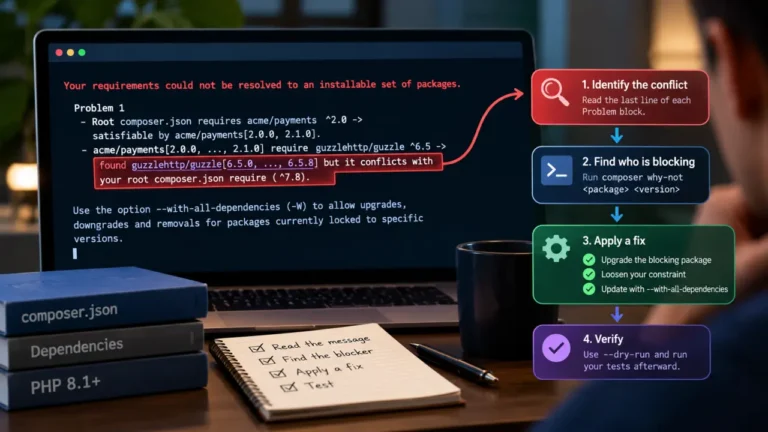
Downgrade for now, without editing composer.json. The Composer CLI supports a temporary constraint on a partial update:
composer update acme/http-client:1.4.2Here acme/http-client stands in for your real package. This moves only that package to 1.4.2 and records it in the lock file. Your ^1.4 constraint in composer.json stays the same, so a later full update will pull the broken version again. Use it to unblock yourself today, not as the permanent fix.
Exclude only the broken release. Composer accepts != inside a constraint, and a comma means AND:
{
    "require": {
        "acme/http-client": "^1.4.2, !=1.5.0"
    }
}
This keeps you on the caret range and skips exactly one release. When the maintainer ships 1.5.1 with compatibility restored, you get it automatically. It is the most honest record of what happened, and it is easy to delete later.
Tighten to patch-only for a package you no longer trust. If a package has broken minor releases more than once, a three-part tilde limits you to bug fixes:
{
    "require": {
        "acme/http-client": "~1.4.2"
    }
}
That gives you >=1.4.2 <1.5.0. The trade-off is real: you also stop receiving new features and some fixes that only land in minor releases, so you now own the job of checking for them.
Update only what you meant to update. When you do need one new package version, name it, and ask Composer to leave everything else alone where it can:
composer update vendor/package --with-dependencies --minimal-changes--minimal-changes (Composer 2.7 and newer) only changes other locked packages when it has to. It keeps an intended upgrade from dragging an unrelated breaking release in with it.
Composer caret vs tilde version: a practical rule set
After all of that, here is what we would actually put in a composer.json:
- Applications: use caret for normal packages, commit
composer.lock, and deploy withcomposer install. Your safety comes from the lock file and from reviewingcomposer update --dry-run, not from the operator. - Libraries you publish: use caret, as the Composer docs recommend. A tight tilde in a library forces conflicts on every project that installs it.
- 0.x packages: use caret.
^0.3stays within0.3.x, while~0.3accepts any0.x, and 0.x releases are allowed to break anything. - A package with a history of broken minors: a three-part tilde such as
~1.4.2, with a comment in your pull request saying why. - A single bad release:
!=exclusion, removed once upstream fixes it.
Whatever you choose, run your test suite after every lock file change. A constraint describes what you are willing to accept. Only tests tell you whether it actually works.
Where AI coding assistants make this worse
An AI coding assistant writes code against whatever version of a library appeared most in its training data. If your lock file holds 1.5.0 and the assistant learned the 1.3 API, it will confidently call a method with the old signature, or one that was renamed. The reverse happens too: it suggests a method that only exists in 2.x while your caret keeps you on 1.x.
Before accepting a suggested call into a vendor class, check the installed version with composer show vendor/package and open the actual file under vendor/. That check takes seconds, and the same routine works when the AI invents a function that does not exist. Official documentation and the source in vendor/ beat any assistant, and this article, on version-specific reference.
What version constraints cannot do
To be honest about the limits:
- No operator detects a breaking change. Composer checks version numbers, not behavior.
- A patch release can break you too.
~1.4.2narrows the risk; it does not remove it. - Transitive dependencies follow the constraints their authors chose. Your tight tilde on a package does nothing about the caret it places on its own dependencies.
composer why vendor/packageshows who pulled a package in, andcomposer why-not vendor/package 2.0shows what blocks an upgrade. composer auditreports known security advisories and abandoned packages. It does not report compatibility breaks.
FAQ
What is the difference between caret and tilde in Composer?
The caret (^) allows all updates below the next major version, so ^1.2.3 means >=1.2.3 <2.0.0. The tilde (~) allows only the last digit you specify to rise, so ~1.2.3 means >=1.2.3 <1.3.0, while ~1.2 means >=1.2 <2.0.0.
Are ^1.2 and ~1.2 the same in Composer?
Yes. Both resolve to >=1.2.0 <2.0.0. Tilde only becomes stricter than caret when you write all three version parts, such as ~1.2.3.
Which is safer for 0.x packages, caret or tilde?
Caret. ^0.3 allows only 0.3.x releases, while ~0.3 allows anything up to <1.0.0. Under semantic versioning, 0.x releases may change anything, so the narrower caret range is the safer choice.
Does composer install ignore my version constraints?
When a composer.lock file exists, composer install installs the exact versions recorded in it, and the constraint ranges only matter again on the next composer update. Without a lock file, composer install resolves the constraints fresh, like an update.
How do I block one broken version of a package?
Add an exclusion to the constraint, for example "^1.4.2, !=1.5.0", then run composer update for that package. You stay on the caret range and skip only the bad release until a fixed version ships.