
If composer update broke your site, the rollback is: put back the composer.lock you had before the update, then run composer install, not composer update. Install reads the lock file and puts back the exact versions it lists, while update would fetch the new versions all over again. If the lock file is in Git, that is two commands. Then check the two things a lock file cannot undo: database migrations the new code already ran, and caches (including OPcache) still holding the new code.
The commands below target Composer 2 on PHP 8.x. Run them on the machine where the broken vendor/ actually lives.
Stop Before You Type Anything Else
A panicked rollback can make things worse, so spend thirty seconds on three things first.
- Do not run
composer updateagain. It will resolve to the same new versions, because nothing about your constraints has changed. - Save the broken state. Copy the current lock file aside, so the rollback itself can be reversed if you picked the wrong “yesterday”:
cp composer.lock composer.lock.broken- If the site is public and throwing errors, put it into maintenance mode with whatever your framework or CMS provides. Visitors should not be watching you debug, and a fatal error page can leak file paths.
If the site is showing a blank page rather than an error, the message is in your log, not on the screen. Our guide to finding the error behind a WordPress white screen covers where to look, and the same approach works for any PHP application.
Why composer install Is the Rollback Command
This is the one piece of Composer behavior the whole rollback depends on, so it is worth being precise. The Composer basic usage documentation, which we read on 2026-09-25, says that when a composer.lock file is present, install resolves the dependencies in composer.json “but Composer uses the exact versions listed in the composer.lock.” The same page says update “will fetch the latest matching versions (according to your composer.json file) and update the lock file with the new versions.”
So the lock file is your “yesterday.” Get the old one back, run install, and Composer rebuilds vendor/ to match it. By default composer update does not edit composer.json at all; it only rewrites the lock file and vendor/. That is why restoring the lock is usually enough.
The Composer Update Broke Site Rollback, Step by Step
Case 1: The old lock file is in Git and not yet overwritten
This is the common case. You ran the update, nothing has been committed yet.
git checkout HEAD -- composer.json composer.lock
composer install
Including composer.json costs nothing and covers the case where you also edited a constraint. On a production server, install without development packages and with an optimized autoloader:
composer install --no-dev --optimize-autoloaderCase 2: The bad lock file is already committed
Find the last commit where the lock file was good, and check out that version of it:
git log --oneline -- composer.lock
git checkout <good-commit-hash> -- composer.lock
composer install
Once the site works, commit the restored lock file with a message that says why, so the next person does not “fix” it by updating again.
Case 3: The lock file was never in Git
This is the hard one. Composer does not keep its own backup of the previous lock file, so look for one elsewhere: a previous release directory if your deploy tool keeps them, a server backup, a copy on a colleague’s machine, or the last build artifact in CI. If none exists, go to the targeted rollback in the next section and pin the packages that broke things, one at a time. Then commit composer.lock so this cannot happen twice. The Composer docs are explicit that committing it is what makes everyone get the same versions.
Rolling Back One Package Instead of Everything
A full rollback throws away every update, including security fixes you may want to keep. Often only one package broke you. Find out which by comparing the package versions in the old and new lock files. This needs jq:
diff \
  <(git show HEAD:composer.lock | jq -r '(.packages + (.["packages-dev"] // []))[] | "\(.name) \(.version)"' | sort) \
  <(jq -r '(.packages + (.["packages-dev"] // []))[] | "\(.name) \(.version)"' composer.lock | sort)
Every changed package appears as a pair of lines. Read the stack trace from the error: the package whose files sit in the frames nearest the failure is your first suspect. If stack traces are not second nature yet, see how to read a stack trace you did not write.
With a suspect in hand, the Composer command-line reference (read on 2026-09-25) documents passing a version constraint directly to update, as in update vendor/package:2.0.1. That lets you move one package back to its old version without touching anything else:
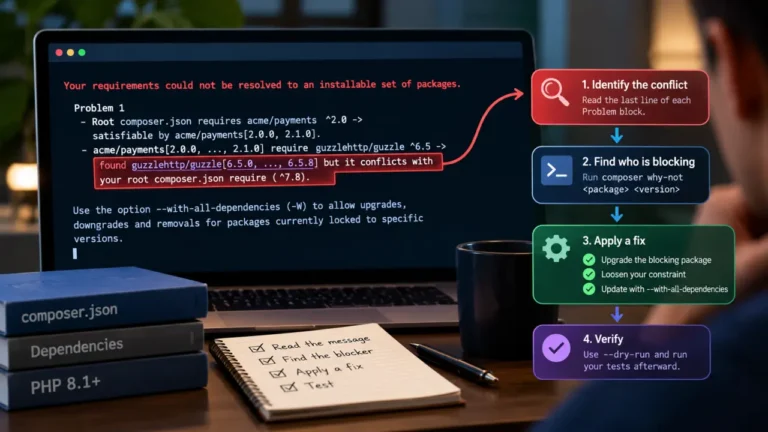
composer update acme/widget:1.4.2Replace acme/widget and 1.4.2 with the real package name and the old version from the diff. Add --dry-run first if you want to see what Composer plans to change. If another package now requires the newer version, Composer will refuse and tell you which one. composer why-not acme/widget 1.4.2 explains the blocker in more detail.
That inline constraint is temporary. The next plain composer update will bring the broken version straight back. To make the rollback stick, block only the bad release with a conflict entry in your root composer.json:
{
    "conflict": {
        "acme/widget": "1.5.0"
    }
}
This is better than hard-pinning to 1.4.2, because a fixed 1.5.1 can still install when it ships. Remove the entry once upstream has fixed the problem.
What the Lock File Cannot Undo
Restoring vendor/ puts the old code back. It does not undo what the new code did while it was running. This is where most “I rolled back and it is still broken” reports come from.
Database migrations. If the update included a framework or CMS version whose migrations ran, your database schema now matches the new code. Old code on a new schema can fail in confusing ways. Check your migration table or your CMS’s update log. If migrations ran, you need either a database backup taken before the update or a migration rollback your framework supports. Do not hand-edit the schema to match.
Application caches. Compiled containers, config caches, route caches and template caches may still reference classes from the new versions. Clear them with your framework’s own cache command.
OPcache. If your server runs PHP-FPM with opcache.validate_timestamps turned off, which is a common production tuning, PHP will keep serving the compiled new files from memory even after vendor/ changes on disk. Reload PHP-FPM (or call opcache_reset() from a web request) after the rollback.
Queued jobs. Jobs serialized by the new code and still waiting in a queue can fail when old code tries to process them. Check your queue after the rollback.
Making Sure It Does Not Happen Again
A broken composer update is almost always a process problem, not a Composer problem. The habits that prevent a repeat:
- Never run
composer updateon production. Run it locally or in CI, test, commit the lock file, and deploy withcomposer install. The server should only ever install what the lock file says. - Update in small pieces.
composer update vendor/packageupdates one package, and--with-dependenciesincludes its dependencies. A failure then points at one change instead of forty. - Review the lock file diff like code. The version-pair diff above takes seconds and belongs in every pull request that touches
composer.lock. The same scrutiny applies when an AI assistant proposes a dependency change, and it is on our list of checks before merging AI-written code. - Back up the database before any update that includes a framework or CMS core package.
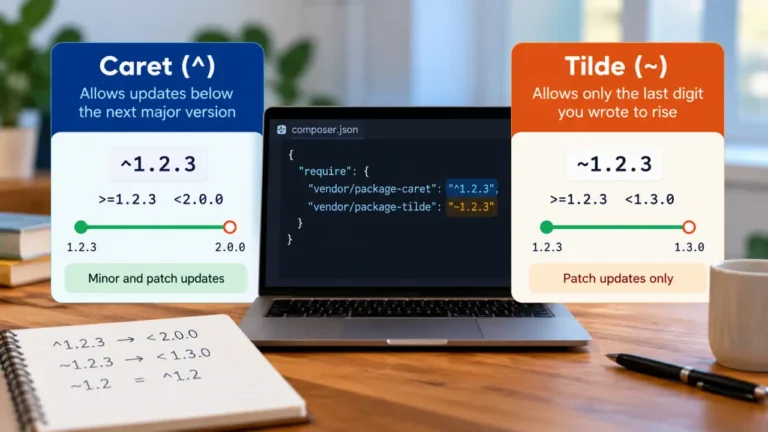
- Understand your constraints. A caret constraint allows new minor releases, so “I pinned it” is often not what the constraint actually says.
FAQ
How do I undo composer update?
Restore the composer.lock file from before the update, usually with git checkout HEAD -- composer.lock, then run composer install. Install uses the exact versions in the lock file, so vendor/ returns to its previous state.
Why is my site still broken after restoring composer.lock?
Most often the new code already changed something the lock file does not control: database migrations, application caches, OPcache, or queued jobs. Clear caches, reload PHP-FPM, and check whether migrations ran during the update.
Can I roll back a single Composer package?
Yes. Pass the old version as a constraint to composer update, for example composer update acme/widget:1.4.2. To stop the next update from bringing the bad version back, add a conflict entry for that release in composer.json.
What if I never committed composer.lock?
Composer does not keep its own backup, so look for a copy in a previous deploy directory, a server backup or a teammate’s checkout. If there is none, identify the broken package from the error and pin it back. Then commit the lock file from now on.
Should I run composer update on a live server?
No. Run updates locally or in CI, test them, commit composer.lock, and deploy with composer install --no-dev. That way production only ever runs versions you have already tested.