[Vue warn]: Hydration node mismatch (or Hydration completed but contains mismatches) means the HTML your server rendered and the HTML Vue expects to produce on the client, from the same component with the same data, do not agree, and Vue is telling you it had to throw away part of the server-rendered page and rebuild it in the browser instead of reusing it. This applies to Vue 3’s SSR hydration process (Nuxt included, since Nuxt is built on it) and holds as described for Vue 3.4 and 3.5; Vue 3.5 added a way to explicitly mark an intentional mismatch (covered below), so which options are available to you depends on your installed version. The console warning almost always names the component and, in recent Vue versions, the specific attribute or node involved, which is where to start rather than re-reading the whole component top to bottom.
What hydration actually is, and why a mismatch matters
Server-side rendering runs your Vue app once on the server to produce static HTML, sends that HTML to the browser so the user sees content immediately, and then runs the app a second time in the browser to attach reactivity and event listeners to that same HTML, a process called hydration. Hydration assumes the HTML the client is about to produce matches what the server already sent, so it can attach behavior to the existing DOM nodes instead of rebuilding them. A mismatch happens when those two runs disagree on the resulting HTML, and it is not just a cosmetic warning: Vue has to discard the mismatched server-rendered nodes and create new ones from scratch to recover, which causes a visible flash of replaced content, briefly non-interactive elements while event listeners reattach, and a real, measurable performance cost on top of whatever caused the actual mismatch.
The three common causes, ranked
1. A value that differs between server and client environments
The most frequent cause: code that reads something only available (or different) in one environment and not the other, most often Date.now(), Math.random(), window or navigator properties, or a locale-dependent date format, evaluated during render. Since the server and the browser run the component independently, at different moments and sometimes in different timezones or locales, the two runs produce different output for the same line of code.
// Wrong: this produces a different value on the server and again on the client
const timestamp = Date.now();
Fix: move anything environment- or time-dependent into onMounted, which only runs on the client, after hydration is already complete, so it cannot conflict with the server’s version:
const timestamp = ref(null);
onMounted(() => {
  timestamp.value = Date.now();
});
2. Invalid HTML nesting that the browser silently rewrites
Browsers correct invalid HTML nesting while parsing, before Vue’s hydration logic ever runs. A <div> nested inside a <p>, for example, is not valid HTML; the browser closes the <p> early and moves the <div> outside it, which means the DOM the browser actually built does not match the DOM the server intended to send, even though the server-rendered string looked correct.
<!-- Server intends this: -->
<p><div>Note</div></p>
<!-- Browser actually parses it as: -->
<p></p><div>Note</div><p></p>
Fix: check for block-level elements nested inside inline or text-context elements (<div> inside <p>, a <button> inside another interactive element, a <table> without proper <tbody>/<tr> structure) and correct the template markup, not the data.
3. Conditional rendering that depends on client-only state
A v-if or computed value that depends on localStorage, a cookie read on the client only, a media query match, or any check for “is this the browser” produces one result on the server (where that check is unavailable or defaults differently) and a different result once the same code runs in the browser. A common secondary symptom of this specific cause: the server-side branch renders with the client-only value simply missing, which can throw Cannot Read Properties of Undefined during the server render itself, before hydration even gets a chance to warn about the mismatch.
Fix: for content that must genuinely differ between server and client (a user preference stored only in localStorage, for instance), render a neutral or server-safe default first, then update it inside onMounted once the client-only value is available, the same client-only pattern as cause 1.
Finding the exact node, not just the component
Guides on this error tend to stop at “here are three causes,” without covering how to actually locate the failing node inside a component that might render dozens of elements, which is the real bottleneck once the app is bigger than a tutorial example. Two checks narrow it directly:
- Read the full console warning, not just the summary line. In Vue 3.4 and later, the hydration warning typically includes the DOM node or attribute involved directly in its output, and setting
__VUE_PROD_HYDRATION_MISMATCH_DETAILS__totruein your build config (Vite’sdefine, for example) restores that detail in a production build, where it is stripped by default to save bundle size. - View source on the server-rendered page and compare it, line by line, against the DOM inspector after the page loads. “View Source” shows exactly what the server sent, before any client-side JavaScript has touched it; the Elements panel in DevTools shows the live DOM after hydration ran. A visible difference between the two is the mismatch, and its location in the markup usually points straight at the component and the specific dynamic value responsible.
When a mismatch is genuinely unavoidable, mark it instead of fighting it
In Vue 3.5 and later, some mismatches are expected and acceptable, a browser extension injecting an attribute, or a value that must legitimately differ, and forcing them to match is not worth the engineering cost. Vue 3.5 added the data-allow-mismatch attribute for exactly this case, applied to the specific element where the difference is expected:
<div data-allow-mismatch="text">{{ clientOnlyValue }}</div>
This tells Vue’s hydration logic to skip warning about (and rebuilding) that specific node, without needing onMounted gymnastics for a difference that was never a bug. It is not available before 3.5; on earlier versions, the client-only pattern in causes 1 and 3 above is the only option.
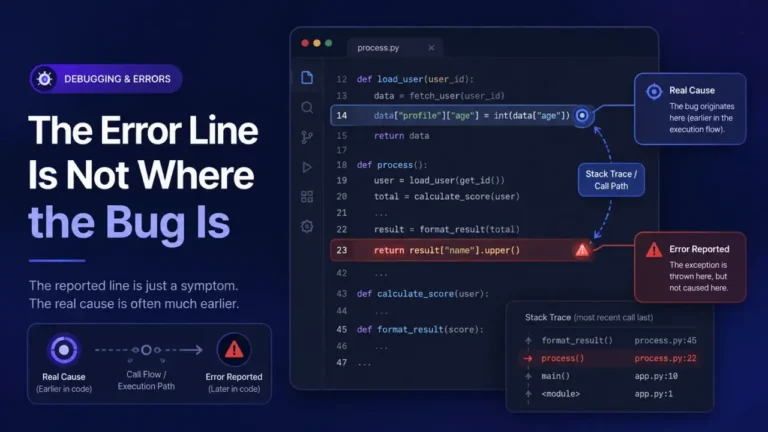
For the general method of reading which component actually failed in a Vue trace, once you have a runtime error rather than a hydration warning, see Reading a Stack Trace You Did Not Write.
FAQ
Does a hydration mismatch always throw a visible error? No, it logs a console warning during development, and the page usually keeps working, since Vue recovers by rebuilding the mismatched nodes. That recovery is the actual problem: it is silent to the user but costs render performance and can cause a visible flash of replaced content.
Is this the same thing as Maximum Recursive Updates Exceeded? No, they are different failure modes that both live inside Vue’s reactivity and rendering system. A hydration mismatch is a one-time disagreement between server and client output on first render; a recursive update loop is a reactive effect re-triggering itself repeatedly, and can happen with or without server-side rendering involved at all.
Why does the mismatch only happen in production, not in local dev? Local development often runs the client-side dev server without full SSR, or with different timing than a production SSR deploy, so environment- and timing-dependent values (cause 1) may not actually differ locally the way they do once a real server and a real browser, possibly in different timezones, are both involved.
Can I just disable SSR for the affected component instead of fixing the mismatch?
Wrapping a component in a client-only render (<ClientOnly> in Nuxt, or the v-if plus onMounted pattern in plain Vue) is a legitimate fix when the content is genuinely client-only by nature, like a browser API-dependent widget. It is a real fix for that specific case, not a workaround, but it also means that content will not appear in the server-rendered HTML at all, which affects SEO and first-paint content for that piece.
Does Nuxt handle any of this automatically?
Nuxt’s <ClientOnly> component and its useState/useAsyncData composables help avoid several of the common triggers (state that would otherwise differ between server and client, direct window access during render), but they do not prevent every possible mismatch, particularly invalid HTML nesting (cause 2), which is a template-correctness issue Nuxt cannot detect for you.