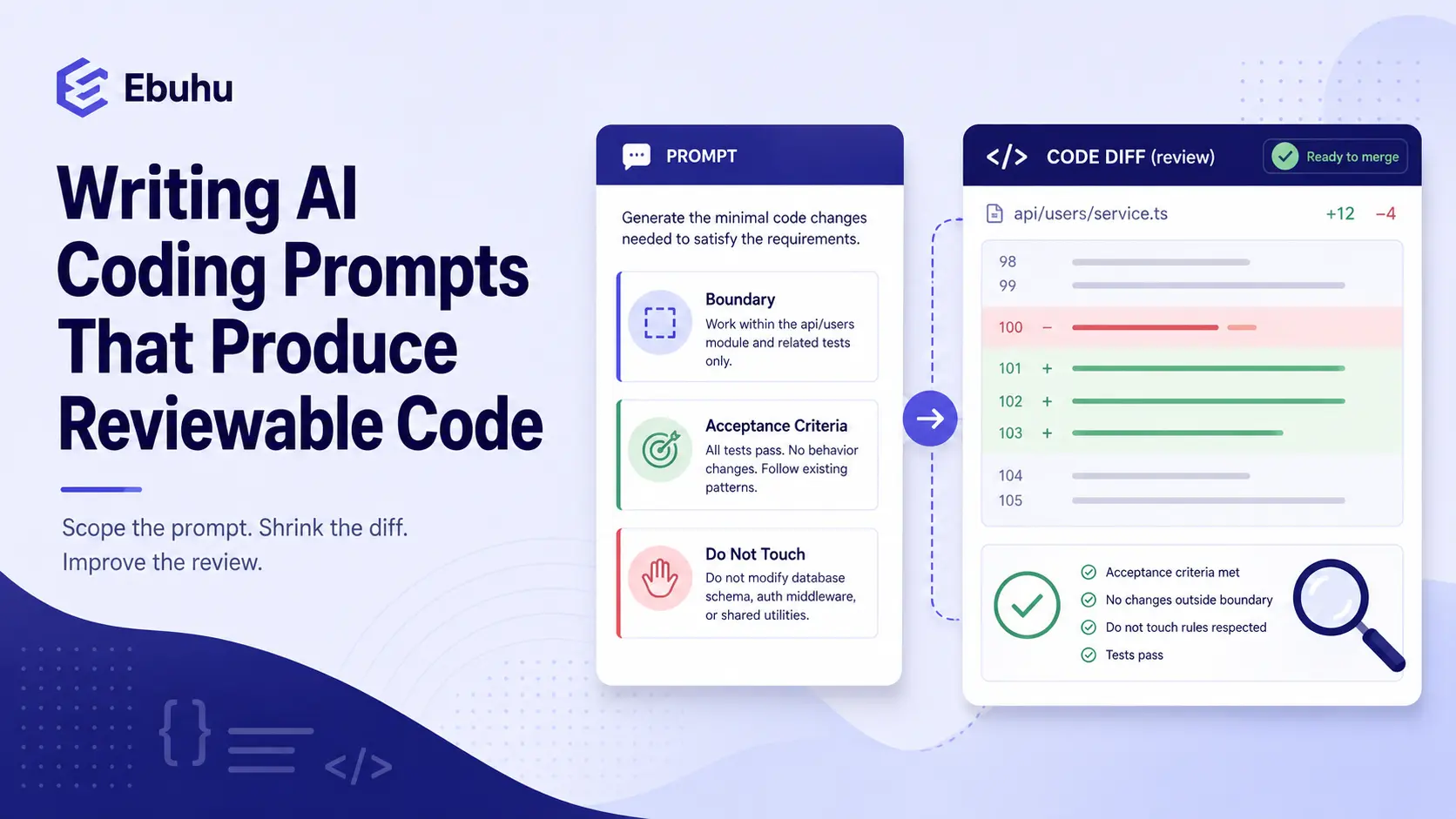
A prompt that names one module, states the acceptance criteria, and says what the change must not touch produces a diff you can actually check. A prompt that describes a feature and leaves the rest to the assistant produces a diff that looks complete and is nearly impossible to review properly, because “complete” and “checkable” are different goals and a broad prompt optimizes for the first. The fix happens before the assistant writes a line: scope the request the way you would scope a task for a new team member, with a defined boundary and a way to tell whether the result is right.
This is not a general theory of prompting. It is bounded to one question: how do you ask a coding assistant so that what comes back is something a human can actually verify, rather than something that merely looks finished.
Why an unscoped prompt produces an unreviewable diff, not just a longer one
The instinct when describing a feature to an assistant is to describe the whole feature, the way you would explain it to a person who will ask clarifying questions if something is unclear. An assistant does not ask clarifying questions unless told to. It fills every gap with its own assumption and produces a complete-looking answer regardless of how much was actually specified. A vague request about “adding validation to the signup form” might come back having touched the form component, a shared validation utility, the error-message copy, and a test file, none of which was explicitly asked for, all of which now needs review.
The problem is not that the diff is long. A long, well-scoped change spanning many files that all genuinely need to change is fine. The problem is that an unscoped prompt cannot distinguish between “this file needed to change” and “the model decided this file should also change while it was in the neighborhood,” and a reviewer has no way to tell which is which without re-deriving the whole task from scratch.
The three things a review-friendly prompt states
One directory, module, or file boundary. Name the specific place the change is allowed to happen. “Add email format validation to SignupForm.tsx” is checkable against that one file. “Add validation to the signup flow” invites the assistant to decide what “the signup flow” includes.
The acceptance criteria, stated as a test. Not “make it more robust” but “reject an email without an @ character and show the existing error-message component with the text ‘Enter a valid email.'” A criterion phrased as something a reviewer can check against the actual behavior removes the ambiguity that a vaguer instruction leaves open.
What the change must not touch. This is the part most prompts skip, and it is the one that prevents scope creep most directly. “Do not modify the shared validation utility; add the check locally in this component” tells the assistant exactly where the boundary sits, rather than leaving it to infer one.
A prompt built from these three pieces is longer to write than “add validation,” and it is worth the extra sentence every time, because the ten seconds spent scoping the request saves the much longer time spent reviewing a diff that wandered.
Asking for a plan before code
One technique catches most scope creep before a single line is written: ask the assistant to describe its plan, which files it intends to touch and why, before generating the actual change, then review the plan itself first. This costs one extra round trip and is worth it disproportionately, because a plan is much faster to review than a diff. If the plan lists a file that has no obvious reason to be touched, that is the moment to narrow the request, not after the code already exists and the sunk cost of an already-generated change makes it tempting to just accept it and move on.
This step also surfaces a different failure early: an assistant that proposes touching five files for what should be a one-file change is often telling you the request itself was under-specified, not that the task genuinely needs five files. Reading the plan is cheaper than reading the diff, and it catches the same problem sooner.
What this does not fix
A well-scoped prompt makes the resulting diff smaller and easier to check. It does not replace checking it. The plausible-but-wrong-logic problem (code that runs, passes the tests the assistant wrote alongside it, and is still incorrect) happens inside a small, well-scoped diff just as easily as inside a large one; scope narrows what you have to review, not whether review is still required. And a diff that grew beyond a single reviewable sitting anyway, whether from an unscoped prompt or a task that genuinely needed to touch many files, needs its own review approach rather than being read the same way as a five-line change.
Scoping the prompt and scoping the context the assistant has access to are related but distinct questions. What actually belongs in an assistant’s context is about what it can see going in; this piece is about what it is asked to produce coming out. Getting one right does not automatically fix the other.
FAQ
Does asking for a plan first slow down every task?
For a genuinely trivial one-line fix, it is unnecessary overhead. For anything that touches more than one file or has any ambiguity about scope, the extra round trip is faster overall because it avoids reviewing and then rejecting a change that wandered.
What if the assistant ignores the “do not touch” instruction anyway?
It happens, and it is itself useful information: a diff that touches a file it was explicitly told to leave alone is a signal to scope the next request even more narrowly, not just to revert the one violation and move on.
Is a longer, more detailed prompt always better?
No. A prompt padded with irrelevant background is not more scoped, it is just longer. The three elements above (boundary, acceptance criteria, exclusion) are what make a prompt review-friendly, not sheer length.
Should I write these prompts the same way for a quick fix and a larger feature?
The three-part structure scales down fine for a small fix (a one-sentence boundary and criterion is enough) and becomes more important, not less, as the task grows, since a larger task has more room for the assistant to make an assumption you did not intend.
Does this replace writing a clear ticket or spec first?
No, it is the same discipline applied at the prompt level. A well-written ticket already contains most of what a review-friendly prompt needs; the point here is not to skip that step but to carry it through into the prompt rather than letting it get lost in a casual restatement.